

Table of contents
In this article, we'll cover how to set up "human-readable" URLs (SEF URLs) on a site running Joomla 5 or Joomla 6. You'll learn how to enable SEF, remove index.php and article id from URLs, and how to use the new features of the System — SEF plugin for strict URL control.
What is an SEF URL?
SEF URL (Search Engine Friendly URL) is a web address whose meaning is clear when read. Unlike "complex" URLs with characters like ?, =, &, SEF URLs consist only of letters, numbers, and separators (-).
- Example of a complex and unclear URL (not SEF):
http://www.site.ru/index.php?option=com_content&view=article&id=1:welcome&catid=1:news&Itemid=50 - Example of the above URL as an SEF URL:
http://www.site.ru/about-company
The second address is immediately clear to both users and search engines, which positively affects SEO.
How to Enable SEF in Joomla 5 and 6?
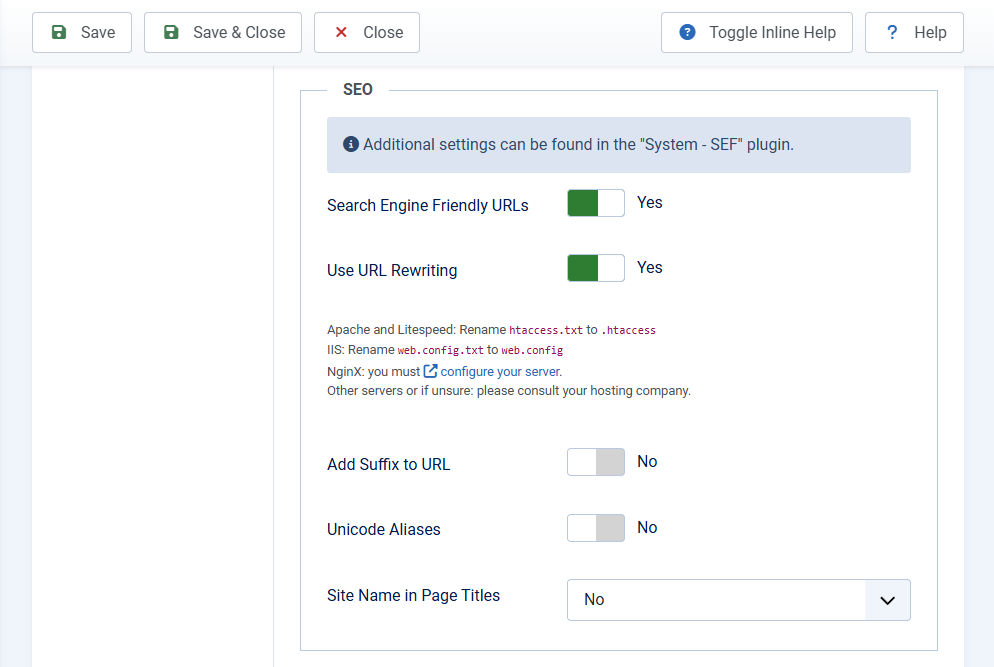
By default, after installing Joomla, SEF URLs are not activated. To enable them, follow these steps:
- In the administrator panel, go to System → Global Configuration.
- On the Site tab, find the SEO Settings section.
- Set Yes for the Search Engine Friendly URLs option.
- Set Yes for the Use URL Rewriting option.
- Click Save.
htaccess.txt file in your site's root folder to .htaccess (for Apache servers) or perform a similar configuration for Nginx. Without this, your site may stop opening.
System — SEF Plugin
Starting with Joomla 5.1, a powerful tool for fine-tuning SEF appeared — the System - SEF plugin. It allows you to configure Strict Routing and manage how Joomla handles URLs.
To access it, go to System → Manage → Plugins and find the System - SEF plugin.
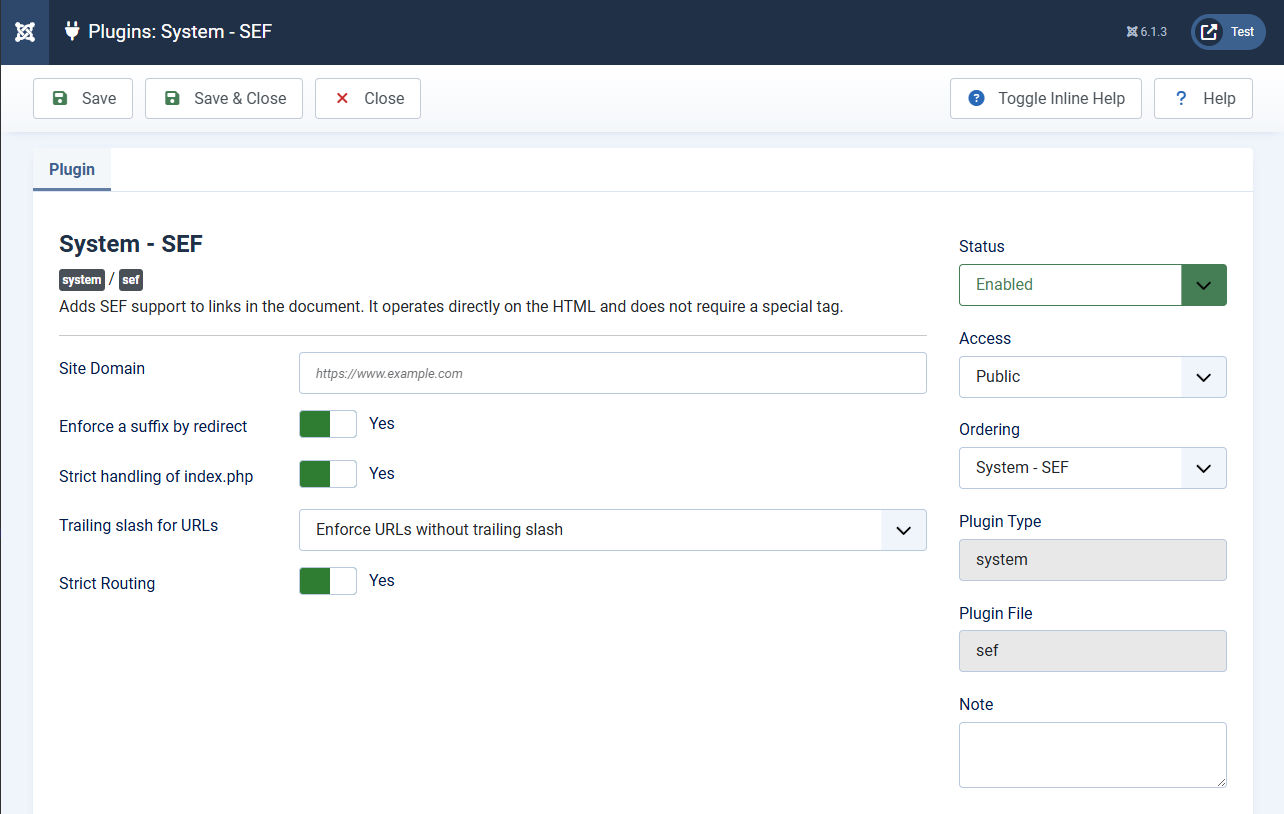
Main settings of the System - SEF plugin
- Site Domain: This field is used to specify the canonical domain of your site. You need to enter your main domain with the protocol (e.g.,
https://www.site.ru). After that, a correct canonical tag<link rel="canonical">will be automatically generated on all pages.Important!If you specify a main domain in this option, different Canonical URLs may be generated for identical pages with different URLs, which can interfere with proper indexing by search engines. We recommend using this setting only in conjunction with the SEF Extended plugin for correct Canonical generation. - Enforce a suffix by redirect: Enable or disable the function of adding a suffix to URLs on the site by redirecting to the correct addresses. This parameter cannot be used if the Add suffix to URL option in the Global Configuration is set to No.
- Strict handling of index.php: Enable or disable the function of removing the
index.phpfragment from URLs on the site that still contain it. This parameter cannot be used if the Use URL Rewriting option in the Global Configuration is set to No. - Trailing slash for URLs: Allows you to strictly set whether URLs should end with
/(with a slash) or without it. Joomla will redirect to the chosen variant. - Strict Routing: Enable or disable the function of excluding duplicate URLs on the site and redirecting to the correct addresses with HTTP/1.1 301 Moved Permanently status.
How to Remove Article and Category IDs from URLs in Joomla?
URLs of articles and categories that do not have a direct menu item contain their numeric identifiers by default. This makes URLs less "clean."
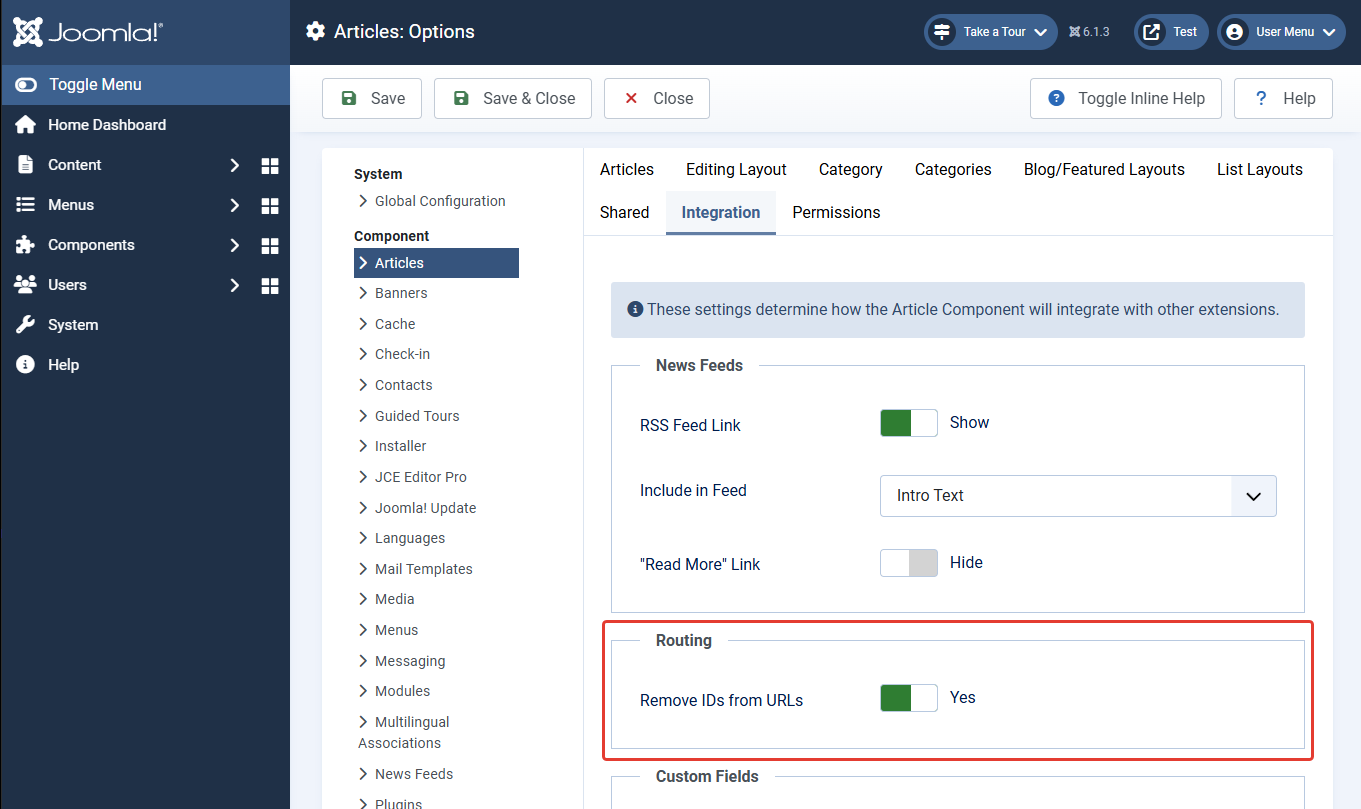
To disable automatic ID addition, follow these steps:
- Go to Content → Articles (or Content → Categories).
- Click the Options button on the toolbar.
- Go to the Integration tab.
- Enable the Remove IDs from URLs option.
- Save the changes.
How to Configure Other SEO Settings?
Other SEF settings are located in Global Configuration on the Site tab in the SEO Settings section:
- Add suffix to URL: Adds a suffix to URLs, most commonly
.html. Currently, using this option is not recommended — it complicates URL perception and can create duplicate pages. - Unicode Aliases: Allows using Cyrillic characters in aliases (and therefore in URLs). When this option is enabled, Joomla stops automatically transliterating (converting to Latin) page titles when creating aliases.
What If SEF URLs Don't Work?
- .htaccess file: Make sure you renamed
htaccess.txtto.htaccess. On some FTP clients, files with a dot may be hidden — enable showing hidden files. - mod_rewrite module: On Apache servers, the
mod_rewritemodule must be enabled. Contact your hosting support if you're unsure. - Nginx settings: On Nginx servers, the
.htaccessfile does not work. Rewrite rules must be added manually to the server configuration. Refer to your hosting provider's documentation. - AllowOverride: In the Apache configuration for your site,
AllowOverride Allmust be set; otherwise, the.htaccessfile will be ignored.
SEF Extended Plugin
For experienced webmasters and site owners who need maximum control over URLs, there is a powerful extension — the SEF Extended plugin. It does not replace but complements the standard System — SEF plugin.

The plugin offers four main groups of functions: Canonical link management, advanced Redirects, custom 404 page setup, and proxy management of the native System — SEF plugin settings.
Canonical Tab
This tab allows flexible management of canonical link generation (<link rel="canonical">), which tells search engines the main version of a page and helps combat duplicates.

Canonical Processing Mode
- Existing Canonical Handling — determines how the plugin should respond if a canonical link already exists on the page (added by a component or another extension):
- Fix system duplicates only (default): the plugin will replace the canonical link only if it points to the current technical URL (i.e., it's a "self-canonical" link often created by the standard SEF plugin). If a component explicitly set a canonical link to another URL (e.g., to a parent category), it will be preserved.
- Always build Canonical through Joomla Router: the plugin will completely overwrite any existing canonical link, replacing it with the URL generated by Joomla's standard router.
- Do not change existing Canonical: the plugin will not touch the already set canonical link, leaving it as is.
- Add Canonical when missing — if a canonical link was not added by a component or another extension, the plugin will generate it through the Joomla router. This is useful if you want to ensure a canonical link exists on all pages of your site.
URL Parameter Management
This group of fields allows you to clean canonical links from unwanted GET parameters that should not affect the main page determination.
- Exclude all GET parameters — when enabled, removes all additional request parameters from the canonical link. When SEF URLs are disabled, parameters necessary for page identification (e.g.,
option,view,id) will be preserved. - Exclude tracking parameters — removes analytics and advertising system parameters such as
utm_*,gclid,fbclid,yclid, and others. This option is available when "Exclude all GET parameters" is disabled. - Exclude pagination parameters — removes pagination parameters:
start,limitstart,limit,page. This option is available when "Exclude all GET parameters" is disabled. - Exclude search parameters — removes typical Joomla and search form parameters:
searchword,searchphrase,ordering,areas,q. This option is available when "Exclude all GET parameters" is disabled. - Exclude the following parameters — allows you to manually specify a list of GET parameters to remove. Enter a parameter name (e.g.,
print) and press Enter. By default,tpandhighlightare added.
Component Exceptions
This feature allows you to exclude individual components or even specific page types from the plugin's management. This is useful if you use a specialized SEO extension for a particular component.
- Component exceptions — here you can add rules. For each rule, you need to select a component (e.g.,
com_content) and, optionally, specify a specific page type. If you leave "All" (the default value), the rule will apply to all pages of the component. For Joomla core components and JoomShopping, the field offers a list of known page types. - How exception works: If a matching rule is found for the current page, the plugin does not build its own canonical link. Instead, it only removes the "self-canonical" link to the current URL if it was added by the standard SEF plugin, preserving the canonical link pointing to another address.
Canonical Debugging
- Canonical Debugging — when enabled, records all decisions made by the plugin to the log file
logs/plg_system_sefextended.php. This is an indispensable tool for diagnostics if canonical links are not being generated as expected.
Redirects Tab
This tab allows you to configure automatic 301 redirects to bring URLs to a single, "clean" format, improving SEO and user experience.

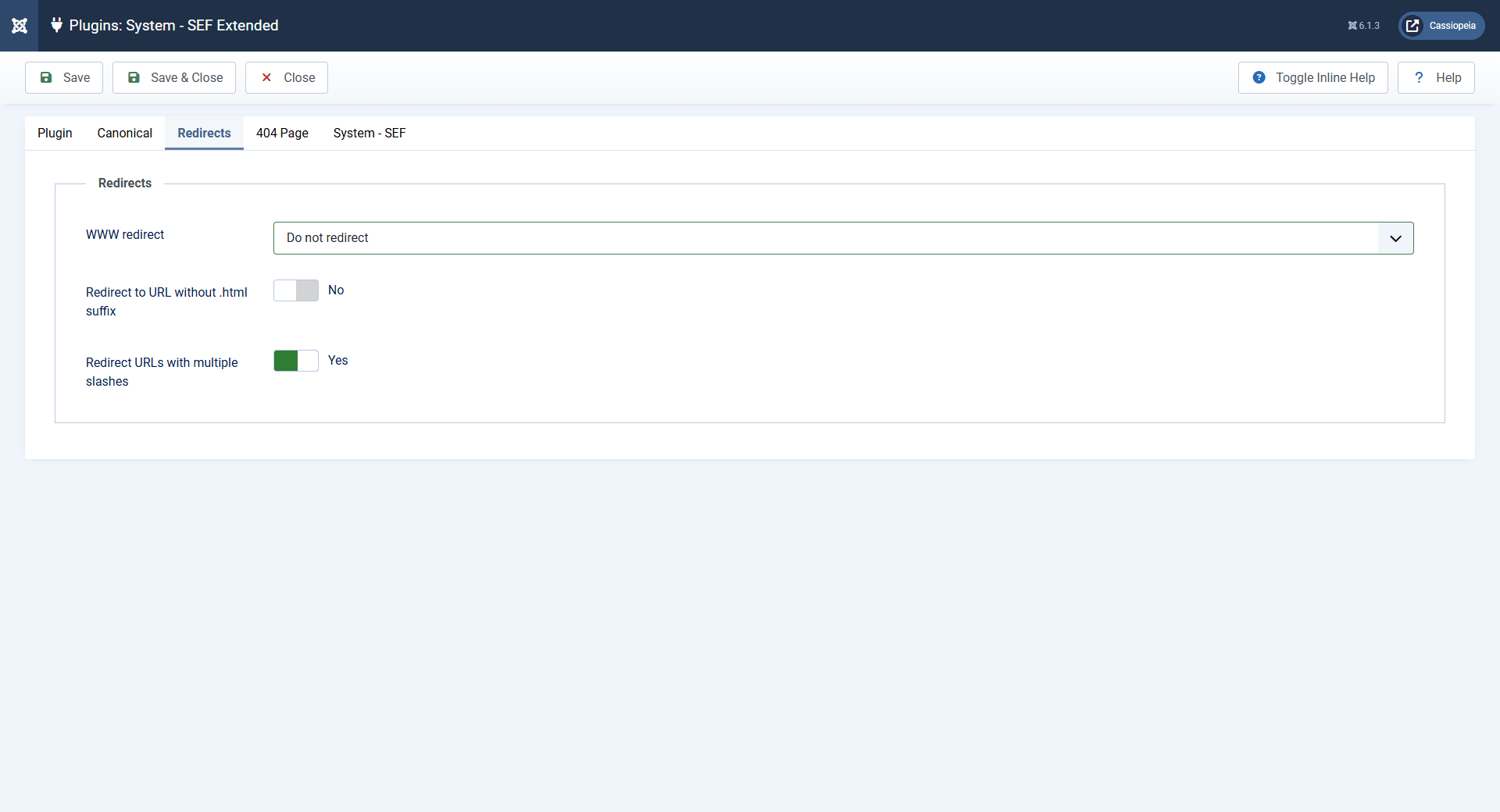
- WWW redirect — allows you to choose a single hostname (domain) variant for all site pages. You can:
- Do not redirect — leave as is.
- To www — all requests to the domain without www will be redirected to the URL with www.
- Without www — all requests to the domain with www will be redirected to the URL without www.
- Redirect to URL without .html suffix — if enabled, URLs ending with
.htmlwill be redirected to the same URL without the suffix. The rule only works when SEF URLs are enabled and suffix addition is disabled in Joomla Global Configuration to avoid conflicts. - Redirect URLs with multiple slashes — when enabled, replaces two or more consecutive slashes in the URL path with one. This helps avoid duplicates like
/category//subcategory.
404 Page Tab
This feature allows you to show a specially created menu item with any content (text, images, modules) for non-existent URLs instead of the standard "bare" Joomla error page.
- 404 Page — select a published menu item whose content will be displayed when a non-existent URL is requested. In this case:
- The browser address remains unchanged (the user does not see a redirect).
- The server returns a correct HTTP 404 status, which is important for SEO.
- Features on multilingual sites: If the selected menu item has language associations, the corresponding association will be used for the current language. If no suitable association exists, the standard Joomla error page will be shown. When switching languages on such a page, the original path is preserved, and only the language prefix changes.
System — SEF Tab
This tab does not duplicate but provides a management interface for the standard System — SEF plugin settings directly from the SEF Extended interface. Changes made here are saved directly to the standard plugin's configuration.

Conclusion
To get the cleanest and most understandable URLs on your Joomla 5 or 6 site, follow this algorithm:
- In Global Configuration → Site tab → SEO Settings:
- Enable Search Engine Friendly URLs and Use URL Rewriting.
- Disable Add suffix to URL if it is not required.
- In the System — SEF plugin:
- Enable Remove index.php.
- Disable the Trailing slash addition.
- Enable Exclude duplicate URLs (Strict Routing) for automatic redirection of technical URLs to SEF addresses.
- In article settings (Content → Articles → Options → Integration), enable Remove IDs from URLs.
- Additionally, install and configure the SEF Extended plugin.
As a result, you will get addresses like: http://site.ru/news/seo/article.
com_content component. For third-party components, settings may differ.