

Table of contents
- What is a sitemap and why use one?
- Choosing a generator for Joomla 5 and 6
- JL Sitemap: files and scheduled regeneration
- OSMap Free and Pro: a menu-based sitemap
- JSitemap Professional: data sources and SEO tools
- Why Xmap and mapX are historical references
- What belongs in an XML sitemap?
- Sitemaps for multilingual websites
- Telling search engines where to find the sitemap
- Common problems
- Making the choice
A sitemap helps search engines discover Joomla pages and helps visitors find their way around a website. These tasks use different formats: XML and HTML. This guide compares JL Sitemap, OSMap and JSitemap Professional for Joomla 5 and 6, then explains setup and validation.
What is a sitemap and why use one?
An XML sitemap lists URLs you want a search engine to crawl. It is particularly useful for new or large websites and sites with substantial image or video content. Having a sitemap does not guarantee that every listed page will be crawled or indexed.
An HTML sitemap is a regular page of links for visitors. It supplements the menu and helps people find a section. Do not submit it to Google Search Console instead of an XML sitemap.
A sitemap does not replace internal links. Important articles should be reachable through menus, categories or links from other pages.
Choosing a generator for Joomla 5 and 6
Joomla websites commonly use an extension to generate and update a sitemap automatically. Choose according to your content, the generation method and how you maintain the site. Check compatibility for the specific extension version before installing it.
| Generator | Availability | Selection criteria |
|---|---|---|
| JL Sitemap | Free, Joomla 5/6 | Saves XML to files. Includes HTML and image sitemaps and Joomla Task Scheduler integration. Content types use plugins. |
| OSMap Free | Free, supports Joomla 5/6 | Builds on menus and supports Joomla articles. Check that the selected menus provide access to the required categories. |
| OSMap Pro | Paid, supports Joomla 5/6 | Adds third-party integrations and caching. Check that the required plugin is available before buying. |
| JSitemap Professional | Paid, supports Joomla 5/6 | Uses data sources and offers multiple sitemap formats and additional SEO tools. Consider it when you need these features and their configuration. |
For a website using standard articles, start by testing JL Sitemap or OSMap Free on a staging copy. For a shop, directory or forum, first check that the extension retrieves the right pages and generates correct URLs. There is no single winner for every website.
JL Sitemap: files and scheduled regeneration
JL Sitemap saves ready-made XML files, so fetching them does not require full regeneration. This reduces the work involved in serving the sitemap, although generation itself still uses server resources. The current branch targets Joomla 5 and 6.
The package includes integrations for Joomla articles, tags and contacts, Kunena and VirtueMart. For another component, check whether a compatible plugin is available.
Initial setup
Install the component and configure the sources of links for your website.
- Install the current package through System → Install → Extensions.
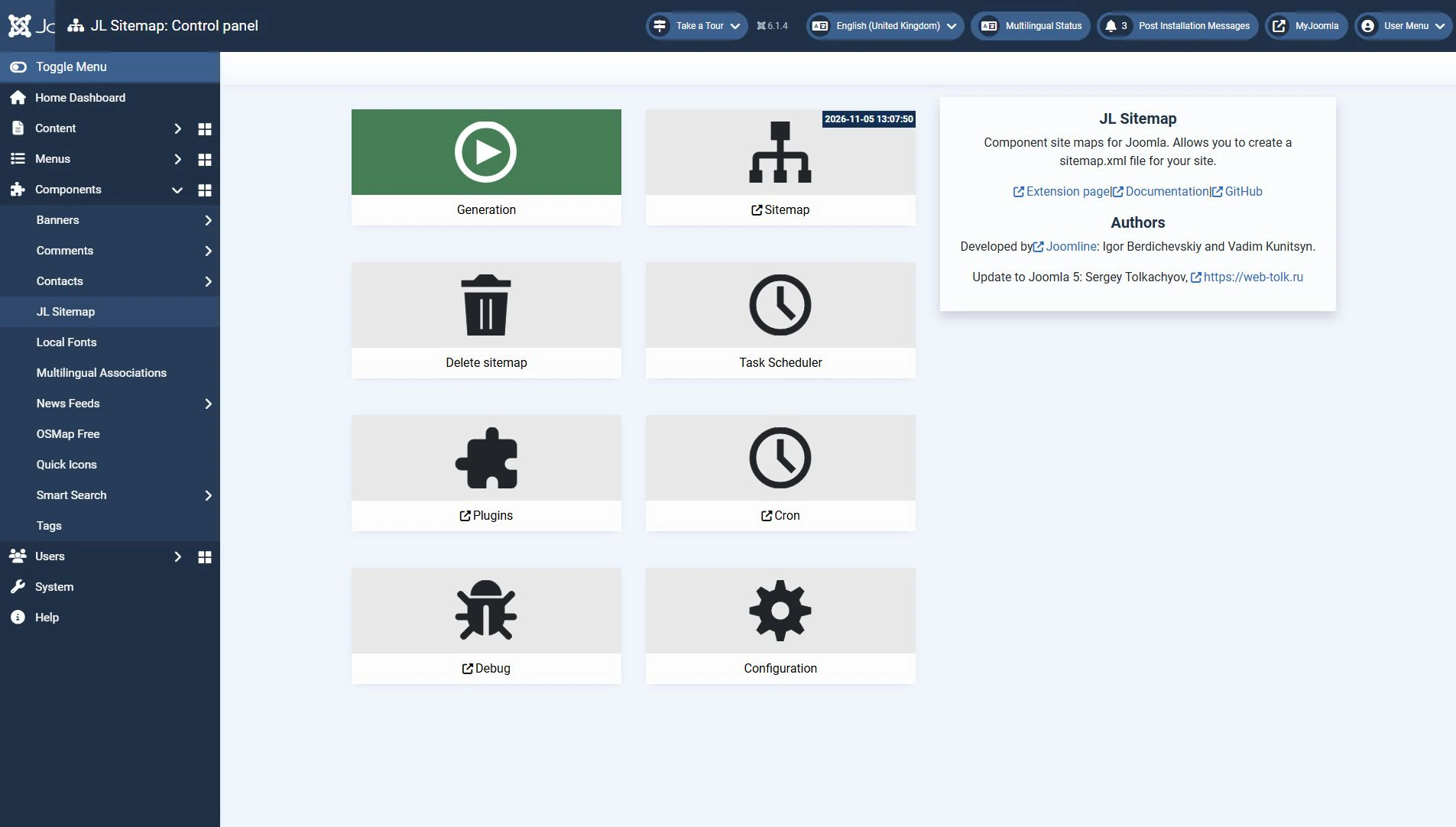
- Open Components → JL Sitemap. Use its Plugins button to enable only the integrations your content requires. These may be disabled after installation.
- Review the options and filtering settings. Base exclusions on actual website URLs. Menu filtering may exclude items that are not associated with the selected menu items.
- Run generation from the component dashboard. Open the resulting XML and check sample article, category and product URLs where applicable.
Automatic updates
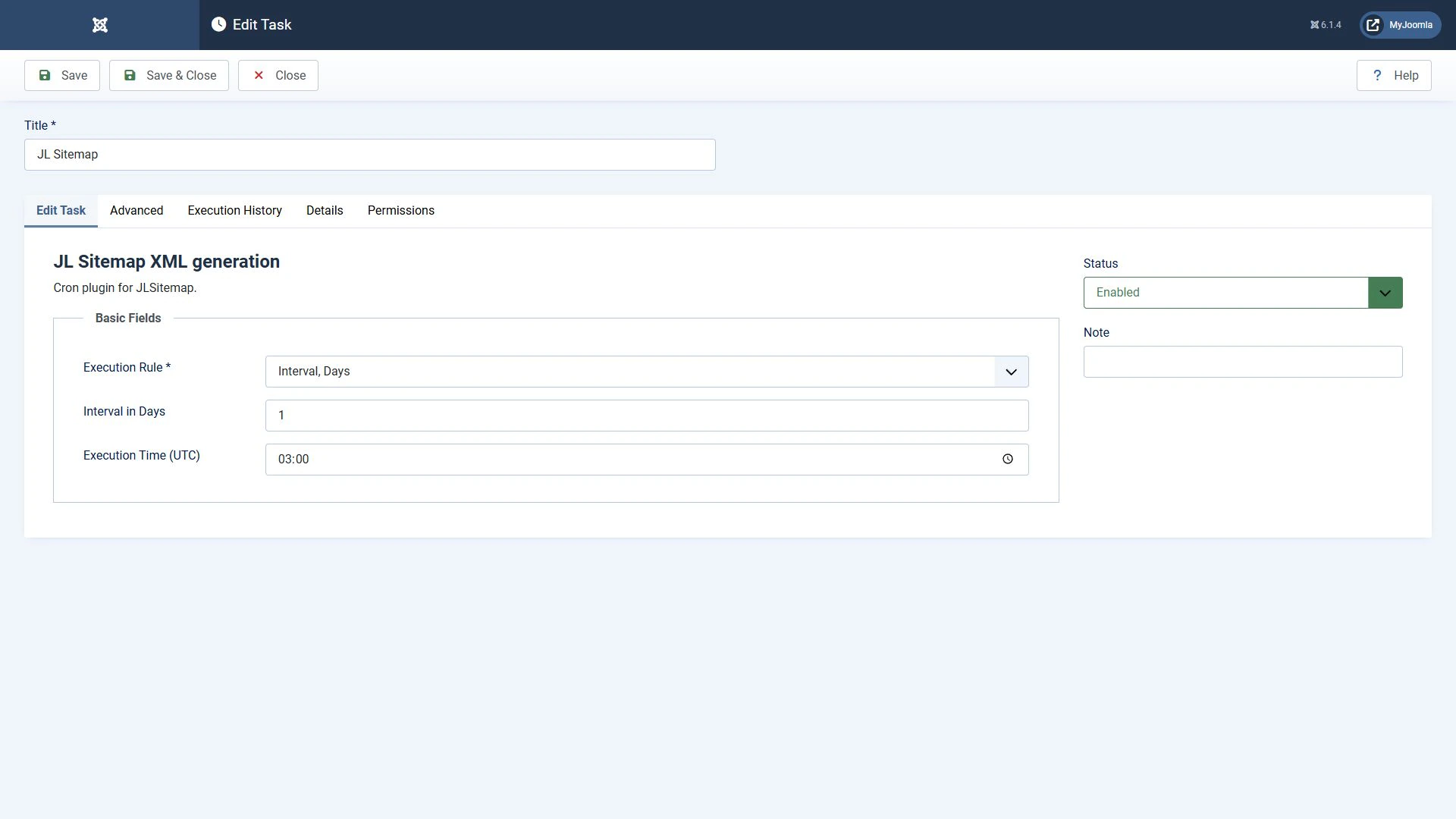
Enable JL Sitemap's plugin in the Task group, identified by the developer as Task - JLSitemap Cron. Under System → Scheduled Tasks, create and enable a JL Sitemap generation task and set its interval. The developer marks the older system trigger plugin as deprecated.
Saving a task does not guarantee timely execution. The Lazy Scheduler depends on website visits. For regular execution regardless of traffic, configure Web Cron or CLI scheduling through your hosting service. After a trial run, check the task result and that the sitemap files have been updated.
An HTML sitemap for visitors
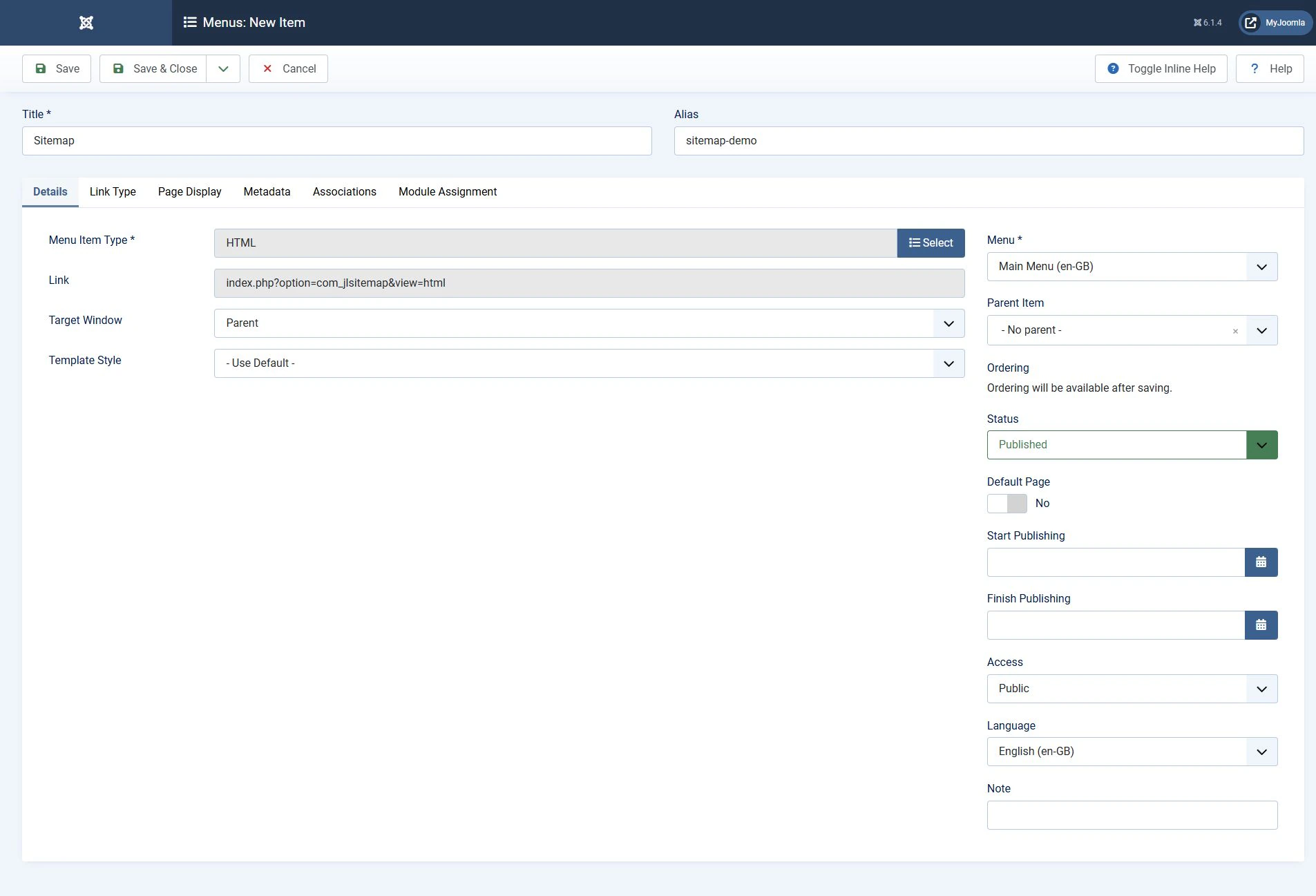
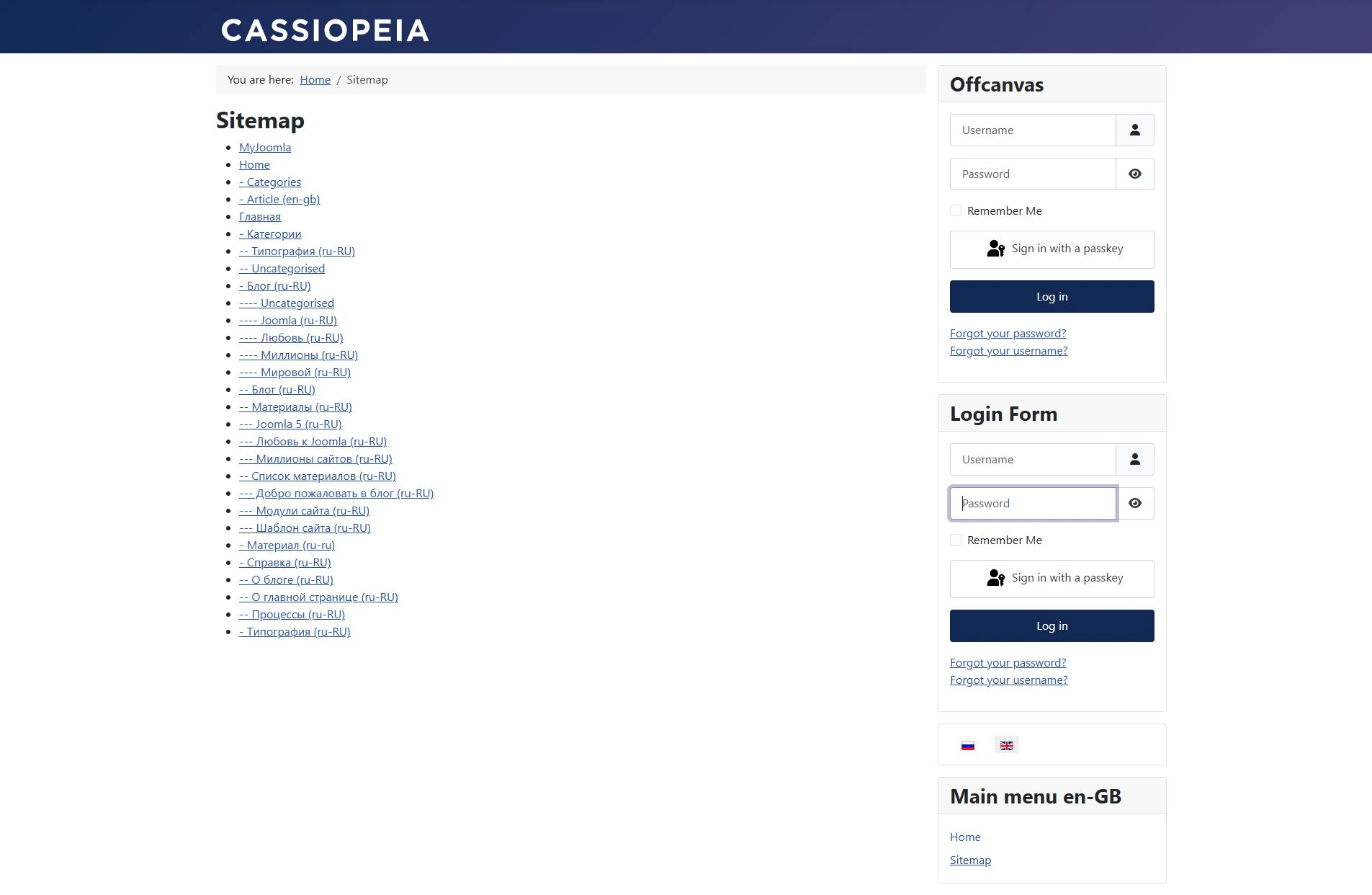
Create a menu item of type JL Sitemap → HTML and set its title and alias. After generation, check the page while logged out. It should list publicly accessible links rather than administrator or restricted sections.
OSMap Free and Pro: a menu-based sitemap
OSMap uses menu structure as the starting point. A menu item linking to a category and an enabled content integration will normally allow the category's articles to be included. You do not need a separate menu item for each article.
- Install a current compatible release of OSMap and open the component.
- Select an existing sitemap or create one. Choose the menus to include.
- Check the Joomla content plugin and integrations for any additional components.
- Open the XML URL provided by OSMap. For an HTML sitemap, create an OSMap menu item of the appropriate type and select your sitemap.
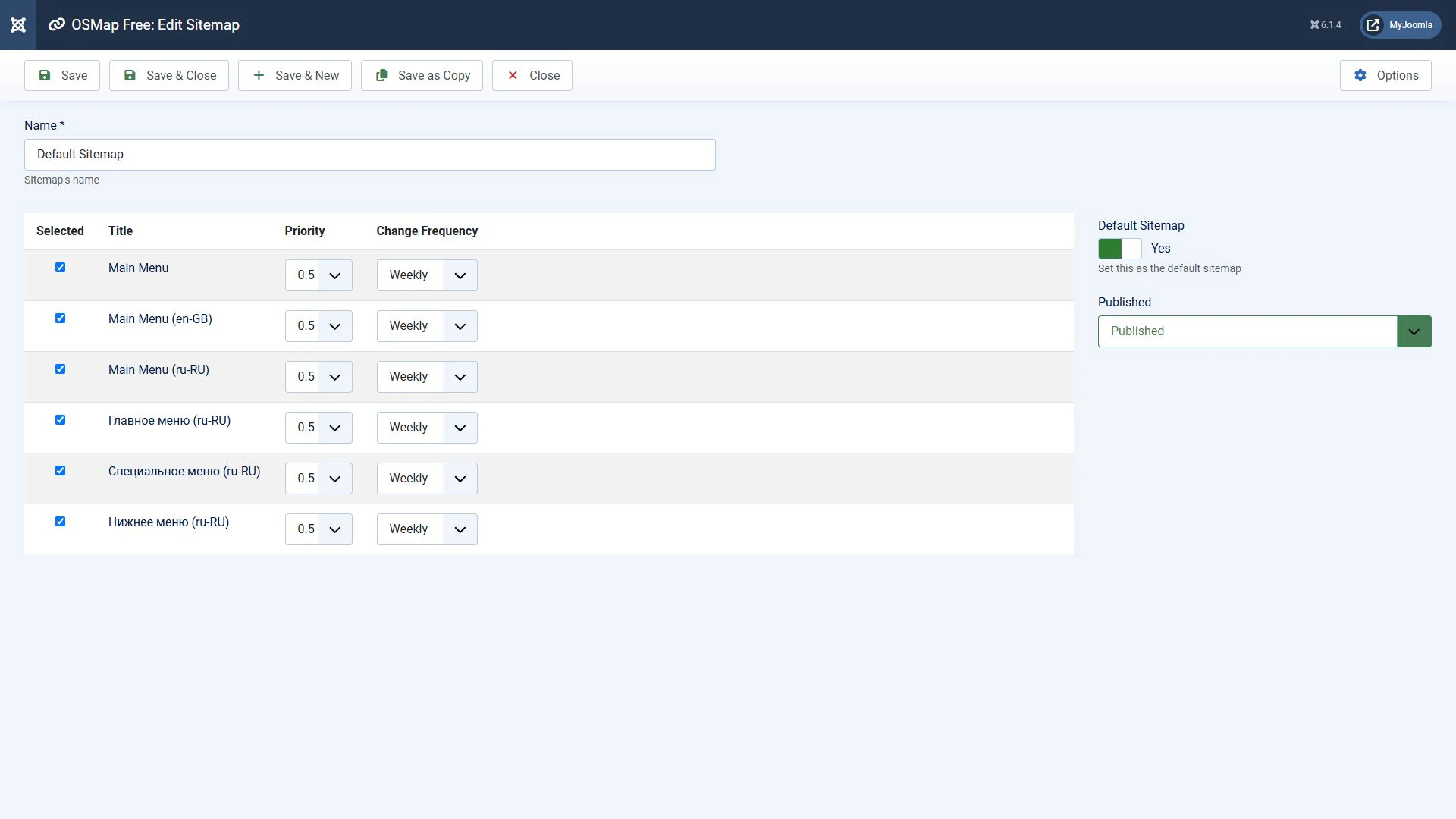
OSMap Free serves core Joomla content. Pro adds plugins and caching. Do not assume that an old Xmap plugin is compatible with current Joomla and OSMap. Check its requirements and output.
Test the exclusion of pages marked noindex separately. Do not rely solely on an old tutorial or edition comparison: features and metadata handling have changed between releases.
JSitemap Professional: data sources and SEO tools
JSitemap Professional generates sitemaps from data sources and offers XML, HTML, image, video and other formats. Its data source wizard and query configuration can connect content without requiring a separate plugin for every component.
This does not mean every integration always works without configuration. Check the selected source, routing, exclusions and accessibility of the resulting pages. Use the SEO audit and metadata tools when your project needs them.
Do not enable several tools that control the same metadata without checking the output. After setup, compare the actual sitemap URLs with the pages' canonical URLs.
Why Xmap and mapX are historical references
Xmap and its mapX fork belong to earlier Joomla generations. The mapX repository explicitly states that development has ended and is archived. For a new Joomla 5/6 installation, choose a maintained solution with confirmed compatibility.
When replacing a generator, retain the previous sitemap URL or update it in robots.txt and the search engine's console. Validate the new sitemap before disabling the old generator.
What belongs in an XML sitemap?
Include the preferred URLs of pages intended for search results. Sitemap entries use absolute URLs with a protocol and domain. This requirement applies to the XML document rather than to internal links in an article.
- A sitemap entry should match the preferred canonical URL. If one page has multiple addresses, also review internal links, redirects and canonical annotations.
- Exclude restricted pages, login forms, shopping baskets and technical filter results unless they are intended for search.
- Check that pages you deliberately include have neither
noindexnor a crawl restriction. - Remove error URLs and redirects. Replace them with working final URLs.
Removing a URL from a sitemap does not remove the page from search. A robots.txt Disallow rule controls crawling and does not guarantee removal from the index either.
XML example
<?xml version="1.0" encoding="UTF-8"?>
<urlset xmlns="http://www.sitemaps.org/schemas/sitemap/0.9">
  <url>
    <loc>https://example.com/services</loc>
    <lastmod>2026-10-28</lastmod>
  </url>
</urlset>
Here, example.com is a placeholder domain and the date represents a page update. Do not reset lastmod for every URL whenever generation runs. If the actual date is unknown, omit this optional element. Google does not use priority or changefreq.
A single sitemap can contain up to 50,000 URLs and must not exceed 50 MB uncompressed. If either limit is exceeded, split it into multiple files and combine them with a sitemap index. This index is different from an HTML sitemap page.
Sitemaps for multilingual websites
Check that published pages in all required languages are included. You can use separate sitemaps or a shared set of files. When supplying language alternatives through XML, every URL needs the complete reciprocal set of hreflang alternatives, including itself. Alternatives must be actual translated versions of the corresponding page.
Check Joomla translation associations and hreflang annotations separately from URL inclusion. Matching aliases alone do not create an association, and a sitemap cannot repair incorrect canonical annotations.
Telling search engines where to find the sitemap
Submit the URL of the generated XML sitemap or its sitemap index.
- Open the XML sitemap or its index while logged out. Use the exact URL provided by the generator. A
.xmlfilename extension is not required if the server returns valid XML. - Choose the correct property in Google Search Console and open the Sitemaps report. Submit the sitemap or index URL.
- Check the processing result. Successful reading does not mean all discovered pages are indexed.
You can also declare the sitemap in robots.txt. Replace this example with the actual absolute URL on your site:
Sitemap: https://example.com/sitemap.xmlThe former Google sitemap ping endpoint no longer works. Do not use it to notify Google of updates. After a successful fetch, Google periodically reads the sitemap again.
Common problems
Start with the checks that match the symptom you observe.
| Symptom | What to check |
|---|---|
| Too few pages | Selected menus, content plugins, filters, publication status and access levels of articles and categories. |
| Old URLs remain | Regeneration of JL Sitemap files or cache refresh in another generator. Regenerate after changing the domain. |
| Google cannot read the sitemap | Access without login, server responses, robots.txt restrictions, XML syntax and PHP messages accidentally included in the XML. |
| Updates do not run | The task status, trigger plugin, scheduler settings and execution log. For lazy scheduling, check the dependency on visits. |
| The browser shows an XSLT warning or plain XML | This may concern browser presentation. Check the XML itself and the search engine's report. Use an HTML sitemap or a viewer that does not depend on browser XSLT. |
Chrome has announced the removal of browser XSLT support. A styled table in a browser should therefore not be the test of a sitemap's validity. The machine-readable XML sitemap and a navigation page for people serve different purposes.
Making the choice
JL Sitemap suits a file-based sitemap updated through Joomla's scheduler. Consider OSMap for a menu-oriented sitemap, with Pro available for additional integrations and caching. JSitemap Professional suits projects that need data sources, multiple formats and extra SEO tools.
After installation, check more than whether a sitemap was created. Validate its contents, crawler access and automatic updates. These checks show whether the generator meets your website's needs.


