




Table of contents
Standard Joomla articles do not include a built-in discussion area. To let visitors ask questions and reply to one another, you need an extension or an external service. This guide explains the differences, how to choose a comment component for Joomla and what to configure before opening discussions.
Ways to add comments
Start with where your content is published. Standard Joomla articles need a component that integrates with articles. For products or entries in a third-party component, check its own review features first: a separate system may be unnecessary.
| Approach | When it fits | What to check |
|---|---|---|
| A dedicated component | Discussions under standard Joomla articles or a shared comment system across several sections | Support for your Joomla version, integrations, moderation and export |
| Reviews built into a shop or content component | Only that component's items need reviews | Whether replies, notifications, permissions and moderation tools meet your needs |
| An external service | The owner is willing to use a third-party platform to store and manage discussions | Current pricing, export options, dependence on external scripts and handling of user data |
You do not need to install a new content construction component just to add comments to existing articles. It is usually simpler to integrate a suitable extension with Joomla's standard articles.
Extensions to consider
There is no universal winner. Choose a maintained package for your Joomla version and check the features you need. Sharing an extension name does not mean that every archive you find is suitable for Joomla 5 or Joomla 6.
JComments and its current branches
The original JComments by JoomlaTune and the community-maintained project in the exstreme/Jcomments-4 repository represent different stages of the project. The old JComments 3.0.7 package should not be treated as a ready-made solution for Joomla 6.
The community repository provides JComments 5.0.6. Its manifest declares Joomla 6 compatibility. This is the component version number, not an indication that it is for Joomla 5. For another CMS version, choose a branch intended for that version and check its package requirements.
JComments is worth considering if you need a free comment system with category and user group settings. The current package includes Russian and English language files. Check older templates, modules and integration plugins separately: component compatibility does not automatically cover them.
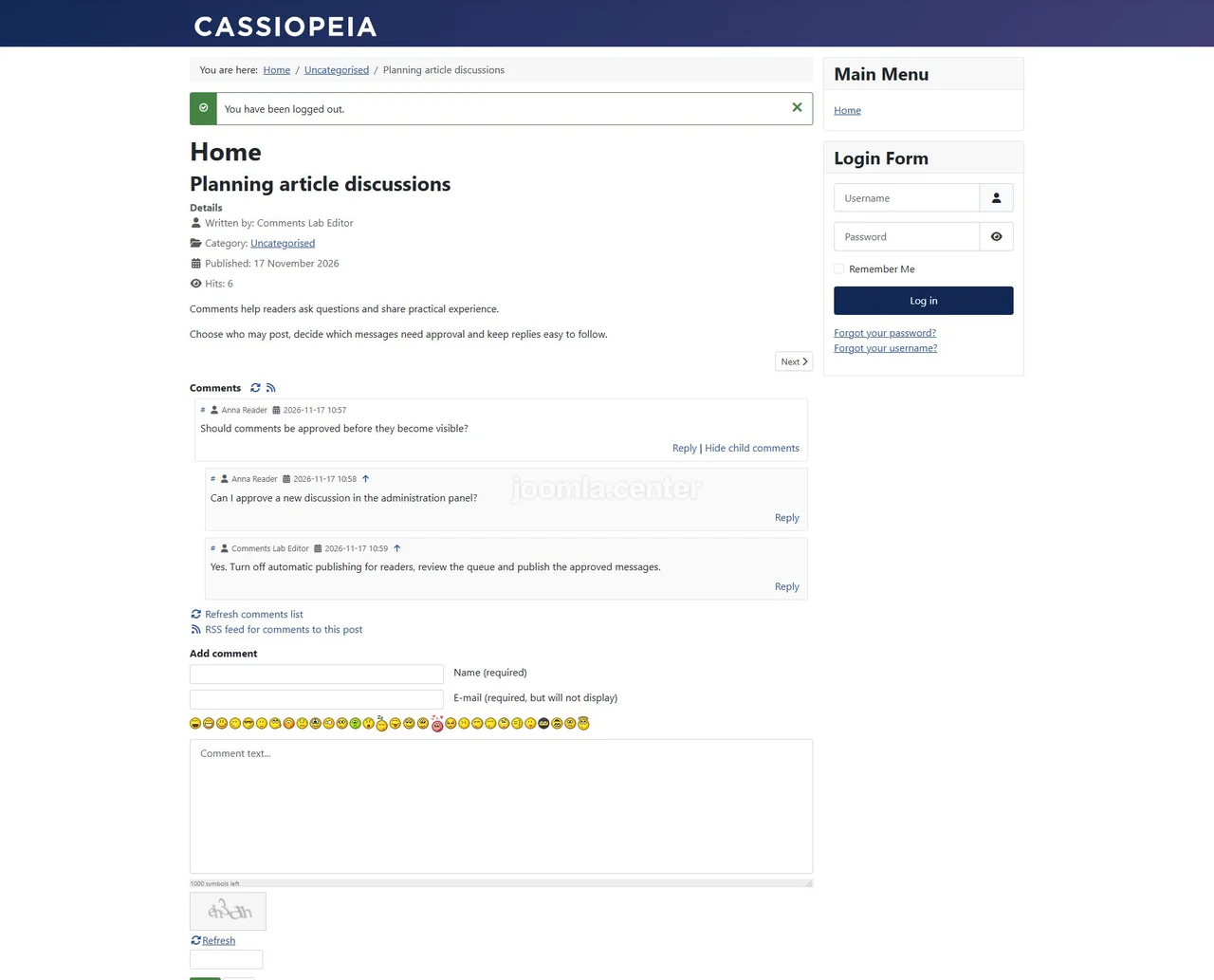
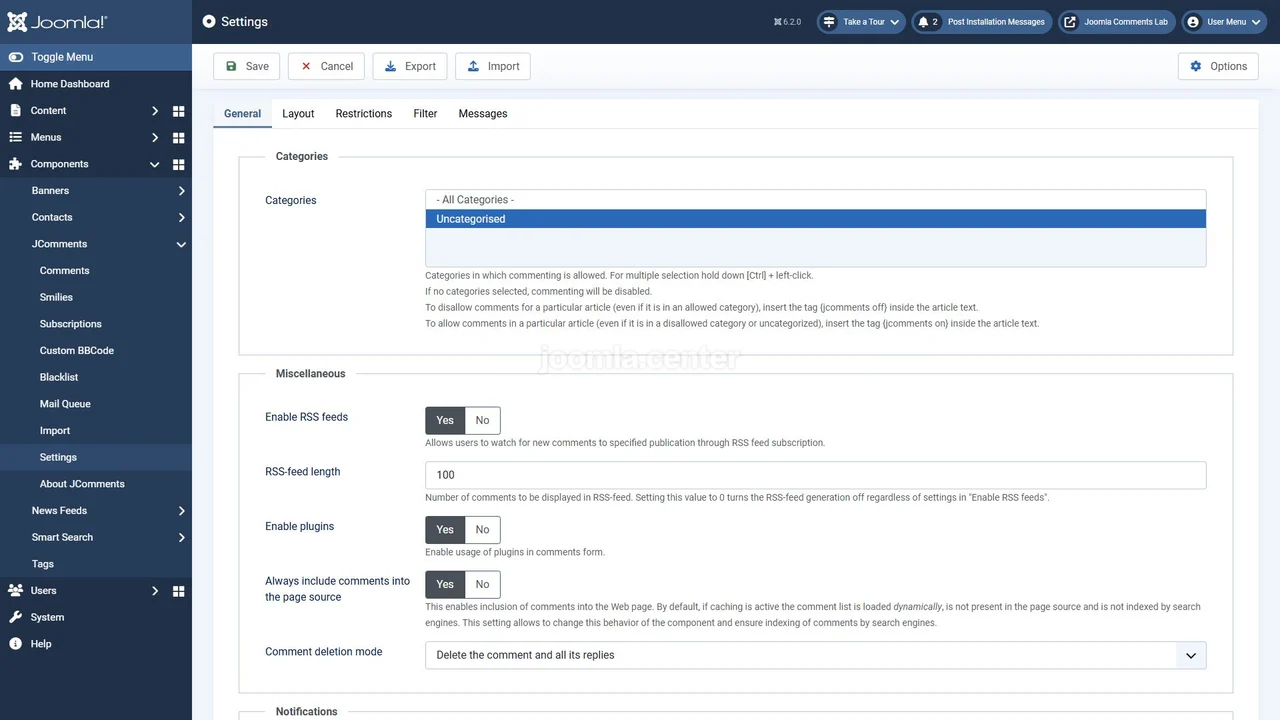
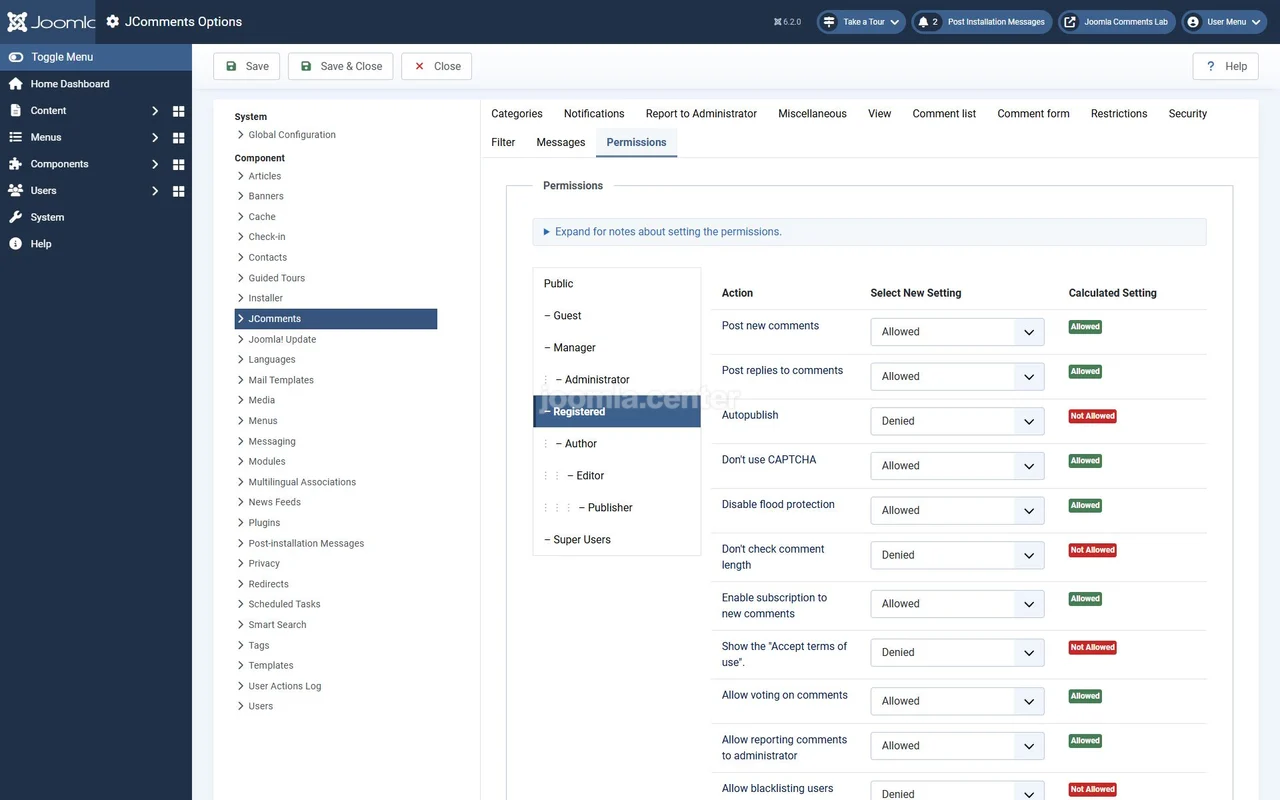
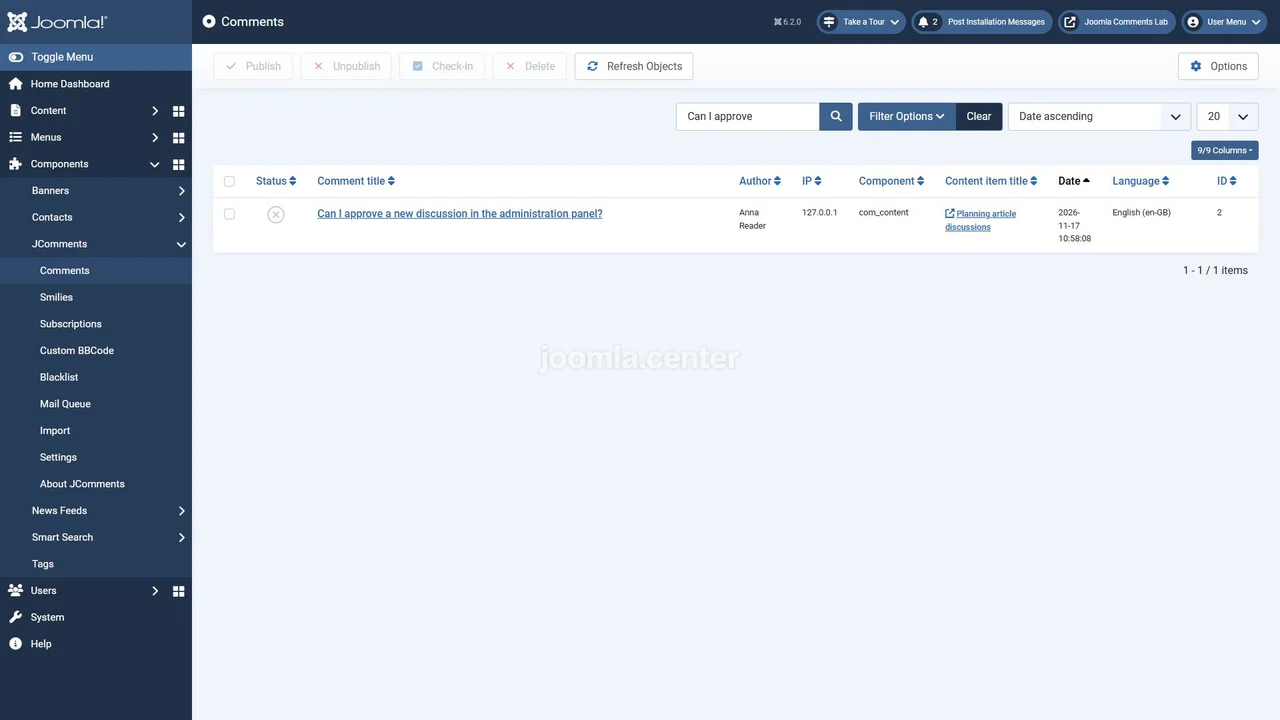
The screenshots show JComments 5.0.6 on a separate Joomla 6.2.0 test installation. Comment submission, moderation, publication and a threaded reply were checked.
JComment
JComment by J!Extensions Store is a separate commercial product. Do not confuse it with JComments: its packages, settings and migration methods differ.
The developer offers comments for articles and other component views, threaded replies, reactions, notifications and publication controls. Importing from other systems is among the advertised features. Before choosing it, check support for your specific content component and whether the importer preserves the data you need.
A general integration claim does not replace a test on the actual page. The form should appear under the correct item, and discussions for different articles and products must remain separate.
RSComments!
RSComments! by RSJoomla is a commercial component with user group settings, moderation, notifications and spam protection. Its official changelog records Joomla 6 support from version 1.14.2. Version 1.14.6 is available at the time of this update.
Watch for differences between documentation pages: an older minimum requirements list may lag behind the release history. Check the current package and the requirements of the complete Joomla, PHP and database combination before installation.
Consider this option when you need configurable permissions for different groups and built-in migration tools. Before purchasing, confirm the update terms and the availability of the language pack you need.
Existing Komento installations and built-in reviews
If your site already uses Komento, JLex Comment or a shop's own review system, assess its condition first. Changing components should solve a specific problem, such as a required integration, missing export tools, discontinued updates or confirmed incompatibility.
An old feature comparison for Joomla 3 is not a basis for choosing a Joomla 6 extension. Themes, social sign-in methods and integrations change. Check the current release and demonstration rather than relying on old prices and comparison ticks.
Choosing a system for your site
Write a short requirements list before installing anything. Questions and replies are often enough for a reference article. Product reviews may also need ratings, purchase verification and different publication rules.
| Criterion | Practical question |
|---|---|
| Compatibility | Does it declare support for your Joomla and PHP versions, and is the package maintained? |
| Publication | Can visitors submit comments while new messages still require moderation? |
| Integration | Will comments work in the specific article, product or component entry? |
| Data | Where are messages stored, how can they be exported and what does an importer preserve? |
| Notifications | Who receives emails, and how can visitors subscribe and unsubscribe? |
| Interface | Are replies readable on a phone, form errors clear and field labels accessible? |
Ratings or structured data alone do not guarantee review stars in search results or higher rankings. Comments are primarily a source of useful feedback that the site owner needs to maintain.
Installation and configuration
Configure discussions on a separate copy of the site first. This lets you test the extension with your template and plugins without risking existing comments. Individual setting names depend on the component you choose.
- Make a backup. Save the files and database. If you already have comments, also check whether they can be exported.
- Install the appropriate package. Use Joomla's standard extension installer. The installable component package, an update and a repository source archive may be different files.
- Check article integration. Make sure the comment integration plugin is enabled. Select the categories that should allow discussions in the component settings.
- Configure user groups. Set permission to read, submit and reply separately. Permission to submit a comment and permission to publish it automatically are different settings.
- Enable moderation and protection. Require moderator approval for new visitors' messages. Configure a posting interval and the available spam protection.
- Check the result on the site. Open an article as a guest and as a registered user. Submit a test message, reply to it and check that it appears after approval.
For JComments, check the selected categories and group permissions in particular. If the form is missing, start by confirming that comments are allowed for that article and user rather than editing the template.
If installation requires a CMS update, prepare a backup and check your other extensions first. Current packages are available in the Joomla downloads section.
Moderation and spam protection
Protection works best as a combination of measures. A CAPTCHA does not replace moderation, and moderation does not prevent a flood of automated submissions.
- Keep only necessary form fields. Do not display authors' email addresses or internal data in the public comment list.
- Limit posting frequency and message length. Check that visitors can understand why a submission was rejected.
- Allow links and attachments only where needed. For files, check type and size restrictions.
- Assign someone to review the moderation queue and reports. Check that notifications actually arrive.
- Tell visitors when a message has been received and is awaiting approval. Otherwise, they may submit it again.
External spam protection, avatars or social sign-in may introduce requests to other services. Check which data is transferred and account for this in the site's settings and explanation of how the form works.
Migrating existing discussions
When changing systems, preserving the relationship between messages and content matters more than merely copying text. Export your data and restore a test copy of the site before importing.
- Confirm that the importer supports your source system and its version.
- Check the mapping of content IDs and components. Matching article and product numbers must not merge their discussions.
- Compare message counts, authors, dates, replies, publication states and any supported subscriptions.
- Open several older pages and check reply nesting and text encoding.
- Disable the old form only after checking the new one. Keep a rollback option until then.
If an external service stores your comments, obtain an export and confirm its format in advance. Do not remove the old component or service account before checking the migration.
Troubleshooting comments
First identify the stage at which the problem occurs: displaying the form, submitting a message, moderation or notifications. This helps you check the relevant settings.
| Symptom | What to check first |
|---|---|
| The form is missing | The integration plugin, enabled category, article restrictions and current group's permissions |
| A submitted message is not visible | The moderation queue and the comment's publication state |
| The submit button does not work | Required fields, spam protection messages and JavaScript errors |
| The discussion appears twice | Simultaneously enabled plugins, a manually inserted form and template overrides |
| Emails do not arrive | Joomla's mail configuration, recipient address, notification settings and spam folder |
| An old result remains after a setting changes | The Joomla cache and other page caching layers |
Investigate on a test copy and change one setting at a time. Disabling multiple protections on the live site makes it harder to identify the cause.
Conclusion
For standard Joomla articles, choose a component with confirmed support for your CMS version, clear moderation tools and a way to preserve your data. JComments, JComment and RSComments! address similar needs but require different packages and settings. Before launch, check the visitor's complete journey: submission, waiting for approval, publication, replies and notifications. If only shop products need reviews, assess the shop component's built-in features first.


