


Table of contents
Joomla is often blamed for duplicate pages, poor indexing and slow loading. These problems can have real causes, but the name of the CMS does not explain them. We look at the tools available in Joomla 5 and 6 and the checks to make on a specific site before changing platforms or installing another SEO extension.
Where SEO myths come from
Advice written for old Joomla releases still appears in articles and discussions. It is mixed with experiences of individual sites affected by unsuitable templates, outdated extensions or configuration mistakes. A problem with one project can easily be mistaken for a limitation of the whole system.
The CMS version matters. As of 6 November 2026, Joomla 6 is the current release series. Joomla 5.4 receives security fixes, with security support scheduled to end on 12 October 2027. Instructions for Joomla 3 and 4 cannot automatically be applied to a modern site.
It is also useful to distinguish crawling, indexing and search rankings. A crawler first needs to retrieve a page. The search engine then decides whether to index it and which queries it should appear for. Installing Joomla or completing its SEO fields does not guarantee any of these outcomes.
Which SEO tools does Joomla include?
Joomla includes tools for URLs, metadata, structured data and language versions. Many everyday tasks do not require a third-party SEO extension. The table covers the standard Joomla 6.2.0 package, including its bundled components, modules and plugins.
Built in means that Joomla includes the tool, although you may need to enable and configure it. With limitations identifies conditions that affect its use. Additional solution required means that an extension, custom code or an external tool is needed.
| Capability | Availability | What it does and what to consider |
|---|---|---|
| Automatic Title generation | Built in | Joomla generates the HTML document title. Global Configuration can add the site name to it. |
| A separate Title that differs from H1 | Built in | Articles and menu items have a Browser Page Title field. The menu item setting can take priority. |
| Main H1 heading | Built in | Article titles and page headings are available. Their output as H1 depends on the layout, template and settings. |
| H2–H6 subheadings | Built in | Added in the article editor. The editor is responsible for their hierarchy and wording. |
| Search-friendly, editable URLs | Built in | SEF URLs and aliases are available for articles, categories and menu items. Removing index.php requires web server rules. |
| Meta Description | Built in | Descriptions can be set for the site, articles and menu items. Check the final meta tag on the public page. |
| Instructions for search crawlers | Built in | Meta robots options, including noindex, are available for the site, articles and menu items. |
| Schema.org structured data | Built in | Bundled plugins provide types and data fields, including Article, BlogPosting, Event and Recipe. Enable and configure the relevant plugins. |
| Language associations and hreflang | Built in | Content languages, translation associations and the Language Filter plugin can generate alternate language links. A multilingual site needs to be configured. |
| Breadcrumbs | Built in | The Breadcrumbs module displays the path through the site structure. Assign it to a suitable template position. |
| Consistent URL variants | With limitations | The SEF plugin supports strict routing and redirects for configured URL variants, including trailing slashes. These settings do not automatically eliminate every duplicate. |
| Canonical URL, rel="canonical" | With limitations | The SEF plugin can generate a canonical link when a site domain is specified. Articles have no standard field for an arbitrary canonical URL. That requires an extension or code. |
| XML sitemap | Additional solution required | The standard package has no XML sitemap generator. Use an extension or an external solution. |
| 301 redirects | With limitations | The Redirect component and system plugin handle URLs that return 404. Redirecting a URL that still works requires another solution, such as a server rule. |
| Image alternative text, alt | Built in | Set in article image options or when inserting an image in the editor. Write a meaningful description. |
| Caching | Built in | View and module caching are available, along with the bundled Page Cache plugin. Dynamic and personalised pages need separate checks. |
| Gzip page compression | Built in | An HTML compression setting is available. Check whether the server or CDN already handles compression before enabling it. |
| Enforcing HTTPS | With limitations | Global Configuration can require HTTPS. A working certificate and server support for HTTPS must be in place first. |
Joomla therefore covers a substantial part of basic SEO configuration without a general-purpose SEO package. Choose additional tools for a specific task, such as an XML sitemap or individual canonical URLs. A field or plugin does not prove that the result is correct. Inspect the finished page, its metadata, headings and server responses.
Myth 1. Duplicates make Joomla unsuitable for SEO
An article can be available at more than one URL, for example through different menu items, URLs with parameters, or both HTTP and HTTPS. Investigate the site structure, routing and server settings to find the cause.
Duplicate content does not automatically trigger a Google penalty. The search engine selects a main, or canonical, URL. Problems arise when it selects an unwanted address while internal links and the sitemap point to different versions.
Work through these checks:
- Collect the URLs that display the same article.
- Choose the main URL and use it in internal links.
- If an alternative address is no longer needed, set up a permanent redirect to the main URL.
- If several versions need to remain accessible, check that rel="canonical" is appropriate.
- Make sure the sitemap contains the intended URL and that canonical signals do not conflict.
A canonical link indicates a preferred version. It is not an unconditional instruction to the search engine. Do not make the homepage canonical for every article or use canonical links to combine pages with different content.
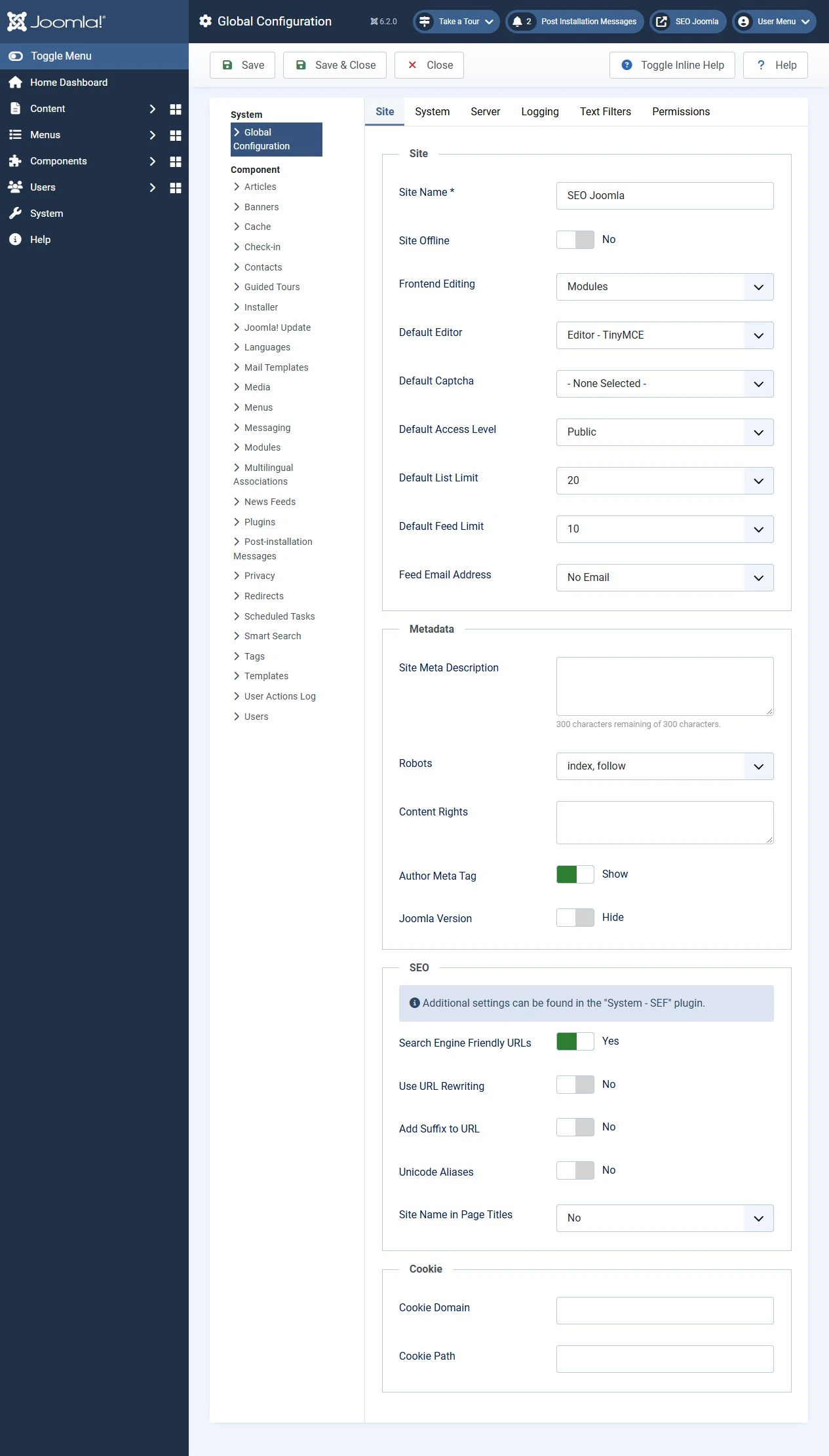
In Joomla, Search Engine Friendly URLs and Use URL Rewriting are on the Site tab in Global Configuration. SEF makes addresses easier to read, but enabling it does not remove all duplicates. Removing index.php requires correct web server rules. On a live site, URL changes need checks of old links and redirects.
Myth 2. Joomla pages are poorly indexed
If an article does not appear in search, start with its specific URL. Check that it is published, accessible without signing in and returns a normal page rather than an error or login form.
Then check restrictions for search crawlers:
- robots.txt controls crawling. A rule in this file does not guarantee that a URL will disappear from Google.
- noindex tells supporting crawlers not to index a page. The crawler needs access to the page to read the instruction.
- CSS, JavaScript and images needed to render the page should be accessible to the crawler.
In Joomla, check the global Robots option, the article settings on the Publishing tab and the relevant menu item options. Extensions can also affect the result. Inspect the final page and HTTP headers rather than relying only on values in the administration panel.
Use URL Inspection in Google Search Console to investigate an individual address. It helps establish whether Google can access the URL and which canonical page it has selected. Allowing crawling and removing noindex do not, by themselves, guarantee indexing.
Myth 3. Joomla cannot manage metadata
The standard Joomla Articles component includes fields for page descriptions and crawler instructions. The browser page title can also be set separately from the article title.
Open the article editor:
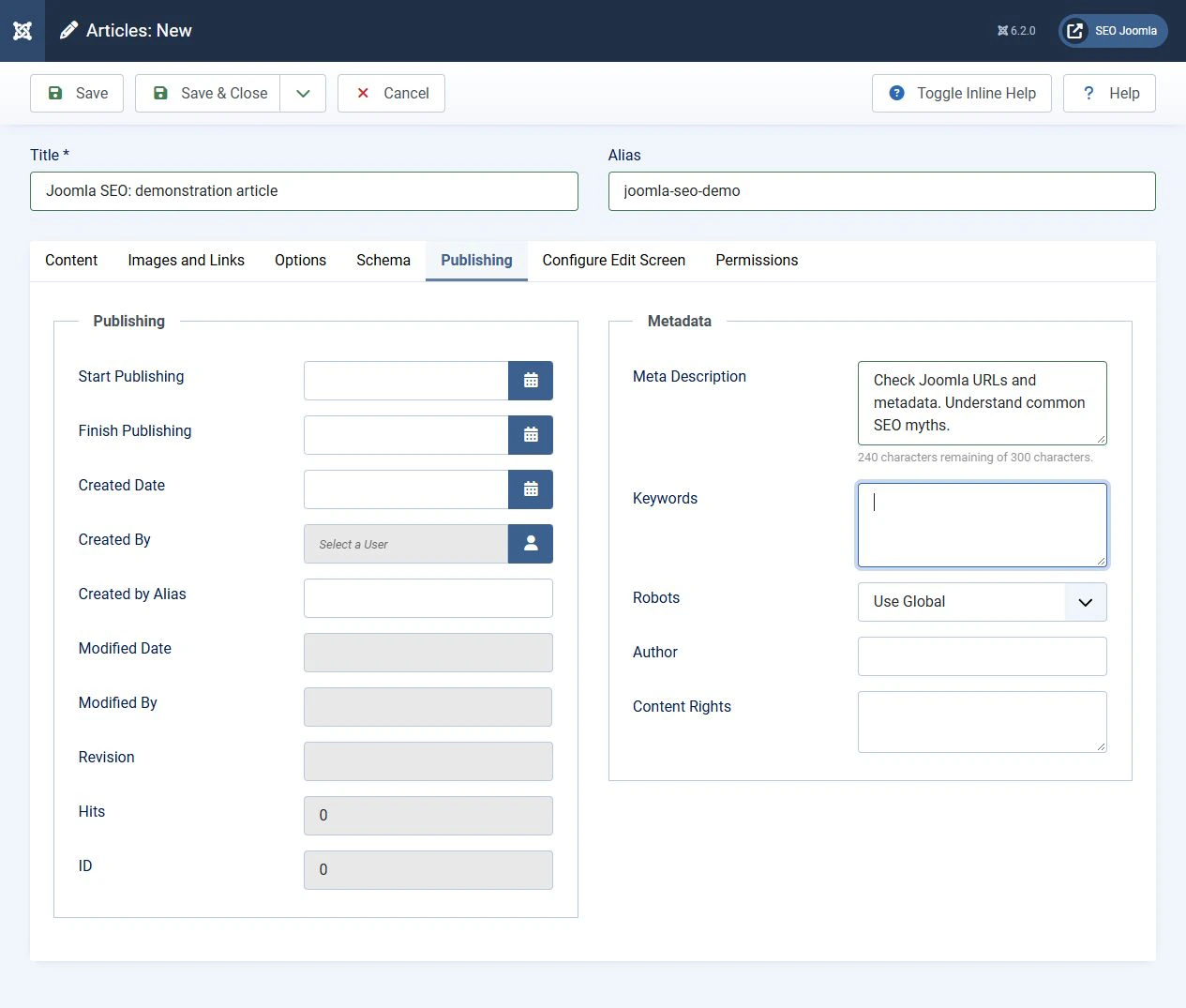
- On the Publishing tab, complete Meta Description and check Robots.
- On the Options tab, find Browser Page Title.
- If a dedicated menu item links to the article, check its page display options too. Its title setting can take priority.
- Open the public URL and inspect the actual title, description and robots output.
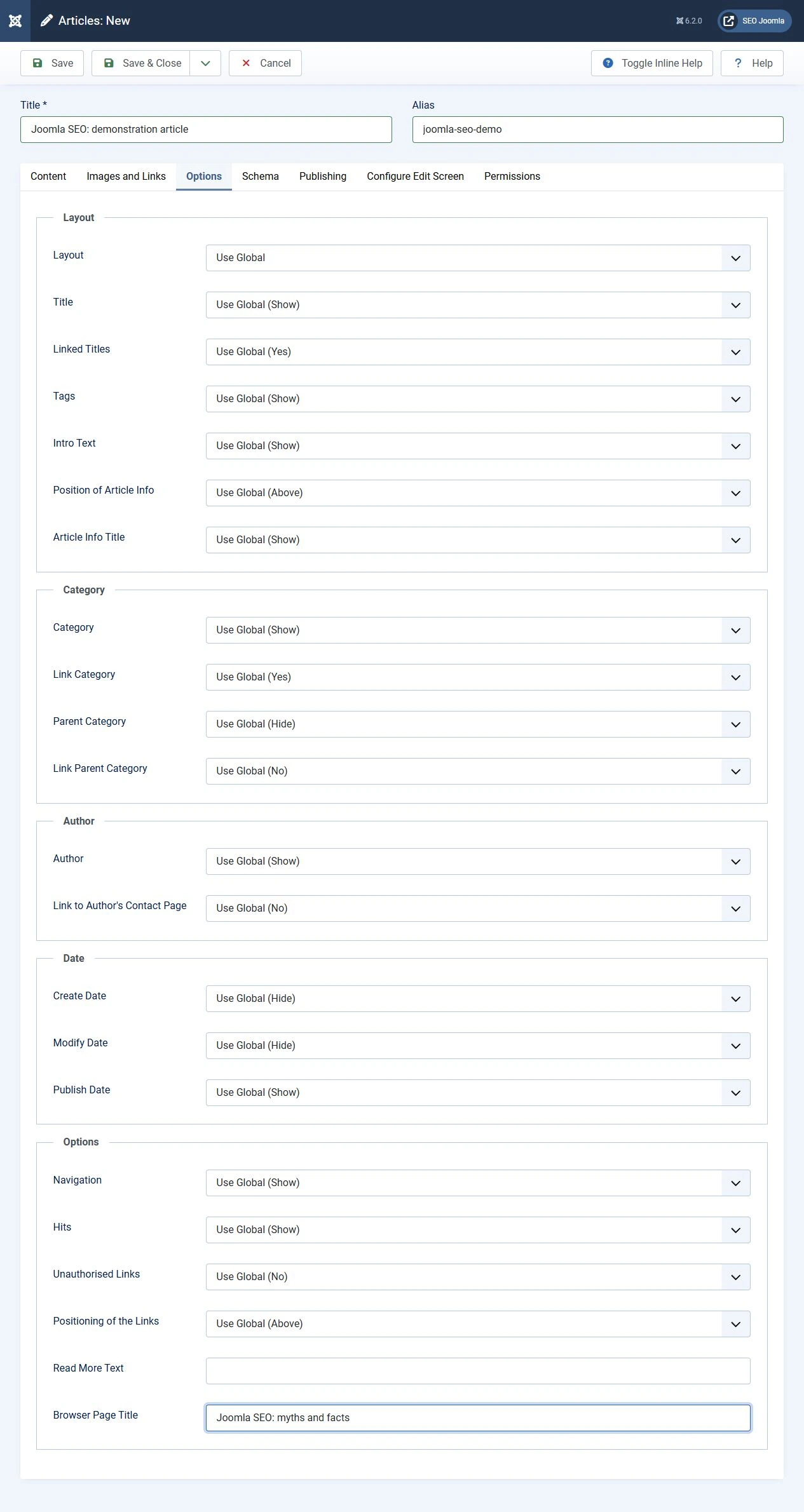
Title and H1 have different purposes. Title names the HTML document, while H1 is the main visible heading on the page. Their wording can differ, but both should describe the same article. Do not add a second H1 to the content if the template already displays the intended heading.
Write Description as a short summary of the page and its value to the reader. Google may use it in a snippet or select another passage for a particular query. The search result title does not have to repeat the title element exactly either.
There is no need to fill in meta keywords for Google rankings. Google does not use this meta tag for ranking. A field's presence in a CMS does not make it a necessary SEO setting.
Myth 4. Every Joomla site will be slow
Speed depends on the entire page, including the server, database queries, template, extensions, images, fonts and third-party scripts. The name of the CMS does not determine how long visitors will wait for a page to load or respond.
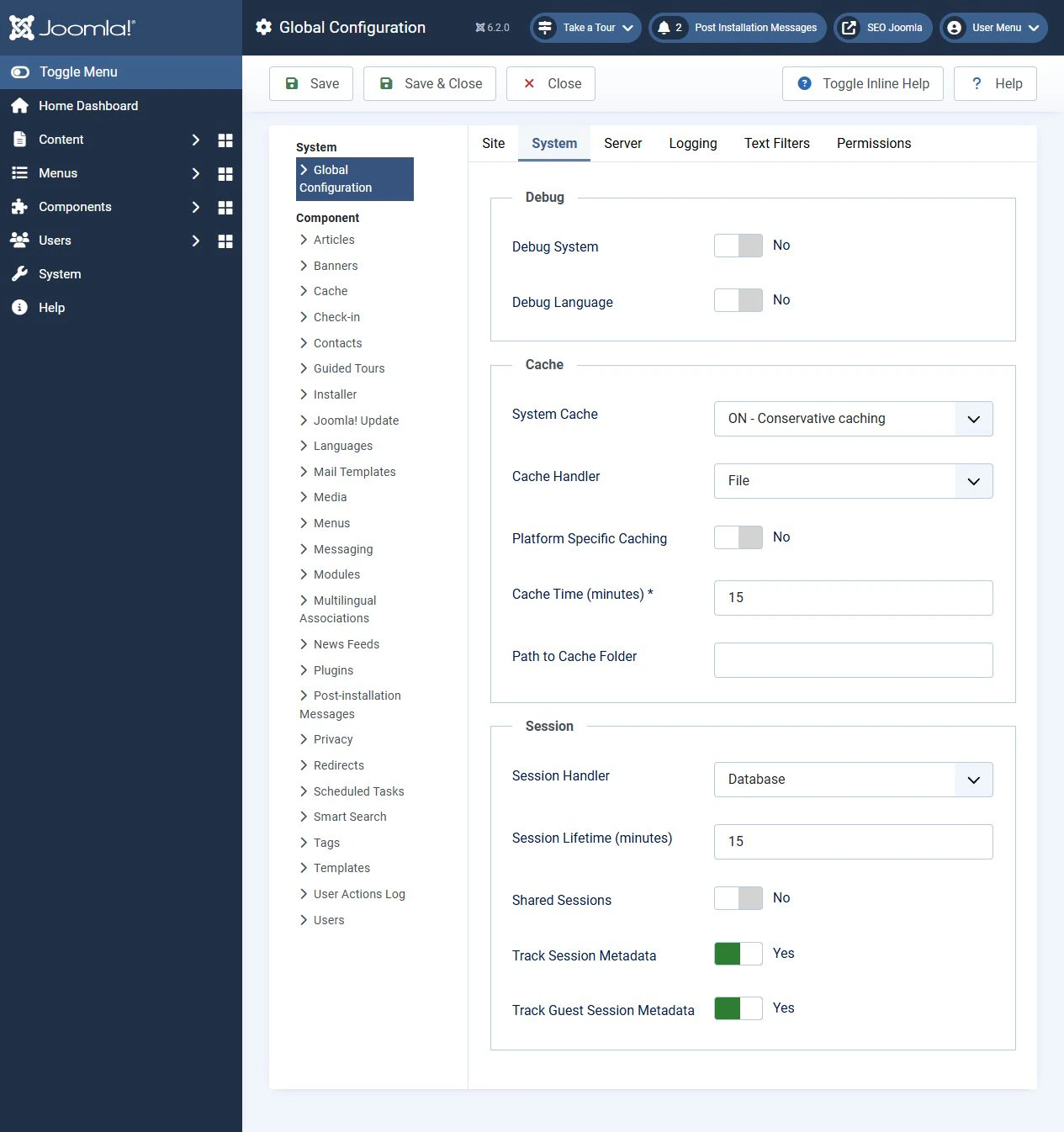
Joomla includes system caching, configured on the System tab in Global Configuration. It can reduce repeated server work, but it will not automatically make large images smaller or remove third-party script delays. Personalised pages, shopping carts and other dynamic content need separate checks for correct cache behaviour.
Start by measuring several typical pages on mobile devices. In PageSpeed Insights, distinguish real-user data from a laboratory test. If there is insufficient real-user data, a lab score does not replace it.
Use Core Web Vitals to guide your checks. LCP describes loading of the main content, INP measures responsiveness and CLS measures visual stability. After making changes, repeat the checks in comparable conditions and confirm that the site still works correctly.
Good page experience matters, but it does not guarantee high rankings. A fast page still needs to answer the visitor's query.
What about structured data?
Joomla 5 and 6 include a Schema.org system with plugins for structured data types. When the system plugin is enabled and configured, a Schema tab is available in the article editor. The choices depend on which plugins are enabled.
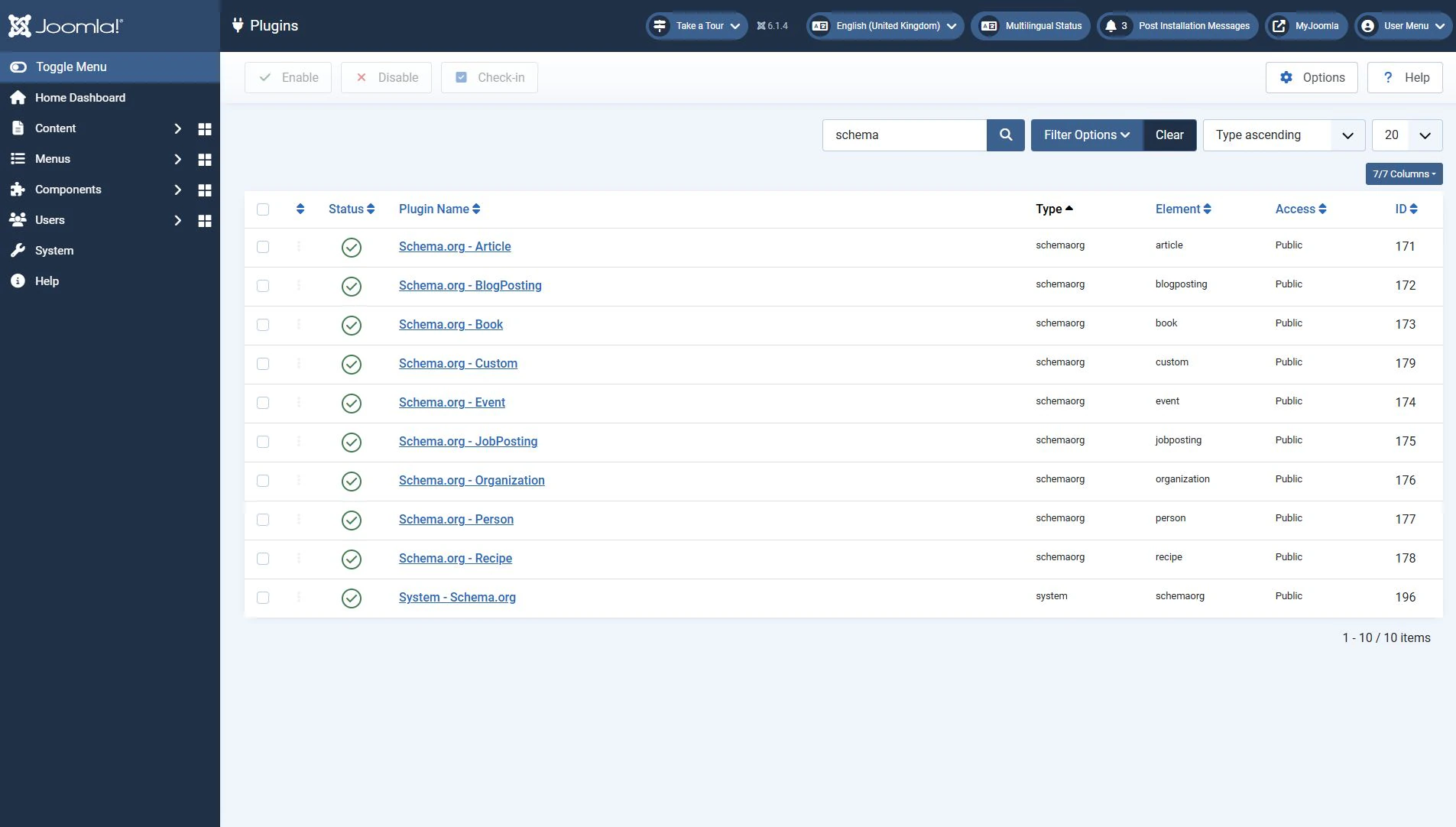
Select a type that matches the page and enter accurate information. If a template or extension also adds structured data, inspect the final output for conflicting values. Do not invent reviews, ratings or other details to attract a more prominent search result.
Use Rich Results Test to check structured data supported by Google. Passing validation does not guarantee a rich result. Structured data helps describe the content, but does not replace it.
What to check first
Instead of debating whether Joomla is suitable, select an important page and run through a short checklist:
- it opens without errors and is accessible to the intended audience
- crawlers have access and noindex has not been set accidentally
- the main URL is used consistently in links, redirects and canonical signals
- title, H1 and description match the content
- clear internal links lead to the page
- images and scripts do not introduce unnecessary delays
- structured data matches the visible information
- the result has been checked on the public page and with diagnostic tools
Conclusion
Joomla provides basic SEO tools, but results depend on how they are used and on the quality of the site. Duplicate URLs, indexing problems and slow loading need investigation. A CMS name alone does not explain them. Fix confirmed causes, verify the changes and repeat the audit after changing the site structure, template or extensions.
Terms used:
Article, Package, CMS, CSS, HTML, JavaScript, SEO, XML, Sitemap, Menu, Redirect, HTTP and HTTPS, URL, robots.txt, noindex, Meta description, Structured data, Indexing, Database, Caching, CDN, Core Web Vitals, Layout


