


Table of contents
A custom shortcode replaces a repeated piece of HTML with a short command. This guide explains how to create a reusable insertion in Joomla with ReReplacer, add a simple parameter and migrate macros from the older RokCandy extension.
How a shortcode works
An author enters a short token, and an extension replaces it with predefined content when preparing the page. For example, [delivery-note] can display the same delivery notice in several articles. When the notice changes, you only need to edit one replacement rule.
This differs from inserting ready-made HTML through an editor template. Copying HTML gives each article its own copy of the markup. A shortcode stores the replacement separately, so changing it can affect every page containing that token.
Joomla does not have a universal syntax for all shortcodes. Square or curly brackets work only where the relevant plugin processes them. A command from one extension does not automatically become a command for another.
Why the RokCandy instructions are outdated
RokCandy by RocketTheme provides BBCode-style macros. The official extensions directory lists version 2.0.4, an update dated 21 July 2020 and compatibility with Joomla 3. This does not establish compatibility with Joomla 5 or Joomla 6, so the old instructions should not be used to install RokCandy on a modern site.
The examples below use ReReplacer. Its developer declares compatibility with Joomla 4, 5 and 6 for the current branch. Check the requirements of the package you intend to install, including its PHP requirements. Support for a Joomla branch does not replace testing your rules, template and other plugins on a copy of your site.
Easy Shortcodes is another option. Its developer also lists Joomla 4, 5 and 6. The Lite edition stores definitions in shortcodes.ini inside the active template's html folder, while Pro provides a component for managing them. Its configuration works differently, so migrating from RokCandy still requires checking each macro.
The fixed insertion and numeric example below were tested on Joomla 6.2.0 with ReReplacer Free 16.3.0 and PHP 8.5.4.
Create a fixed insertion
Start with a token without parameters. This makes the example easier to check, and a fixed insertion is often enough for repeated notices, business details or explanations.
- Back up the site and prepare a separate test copy. Download a compatible ReReplacer package from the developer's official source.
- In Joomla, open System → Install → Extensions and install the package. Then open Components → Regular Labs — ReReplacer and create a replacement.
- Give it a clear internal title, such as Delivery notice. Enter the token in Search:
[delivery-note]Enter the replacement content in Replace:
<span class="delivery-note">We will confirm the delivery time when confirming your order.</span>
For an exact search, turn off Regular Expressions, Treat as List and Word Search. Turn on Case sensitive if the token's letter case should matter. Publish the replacement.
Under Search Areas, select Content (Articles & Categories). Leave content processing enabled for an insertion in the article text. Turn off processing in titles, author names, categories, feeds, the administrator area and edit forms when it is not required.
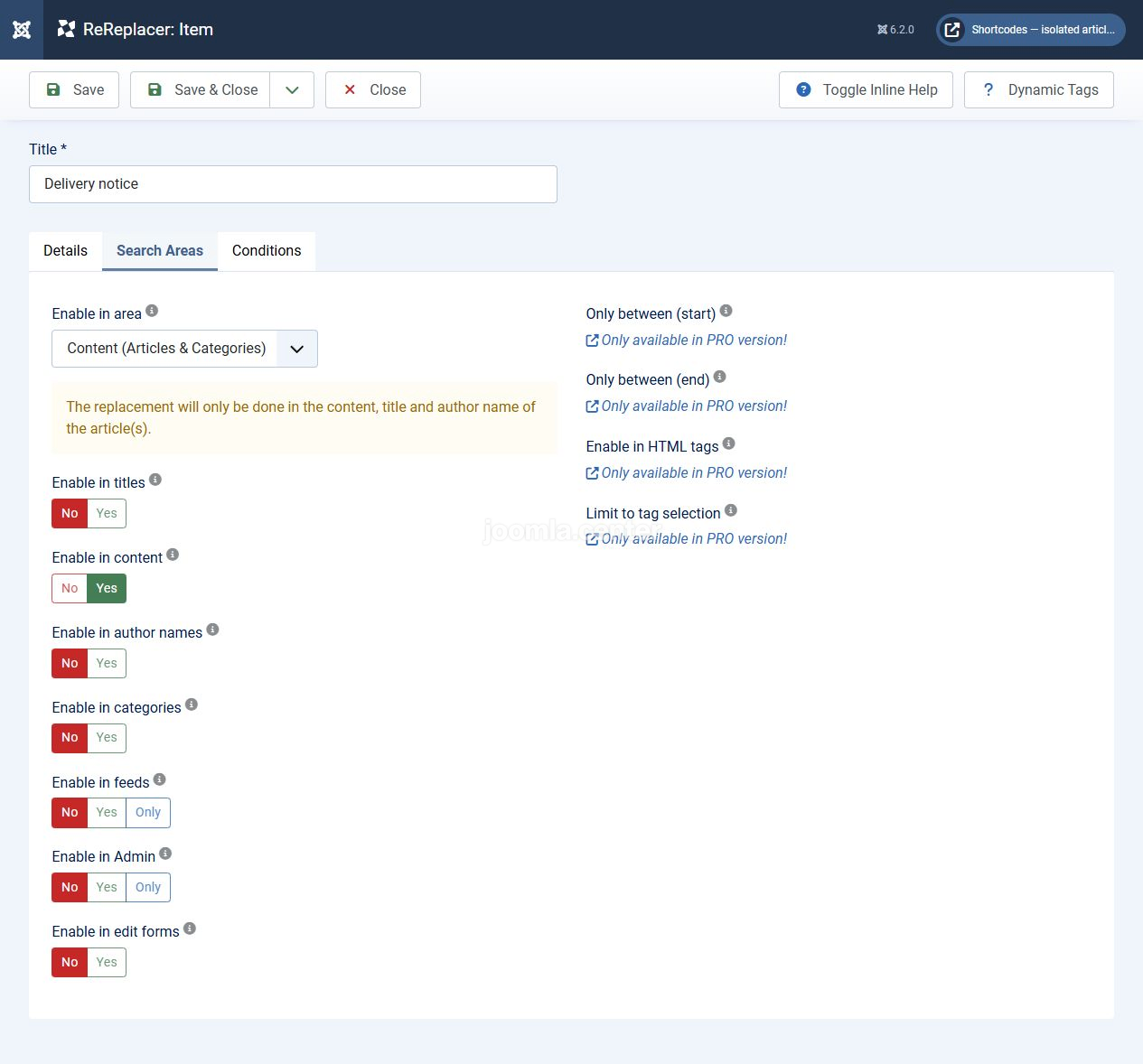
This limits where the rule runs. It does not mean that every piece of text on the site will be processed. For example, output through a module may need a different area. Do not switch to Everywhere without checking the pages this would affect.
Save the replacement. Create a test article and insert [delivery-note] as a separate paragraph. Open the visitor-facing page and check that the notice appears. Then change the notice in ReReplacer and confirm that the page displays the updated version after refreshing the relevant cache.

The example uses span, so it does not create a nested block container inside an editor paragraph. If you later replace it with div or aside, check the surrounding markup and the Strip Wrapping Paragraphs setting.
Add a numeric parameter
When a value needs to differ between articles, you can use a regular expression. For this first example, restrict the parameter to a number so that the rule accepts predictable input.
Create a separate replacement. Enable Regular Expressions and enter this in Search:
\[stock=([0-9]{1,6})\]Enter this in Replace:
<span class="stock-count">In stock: \1</span>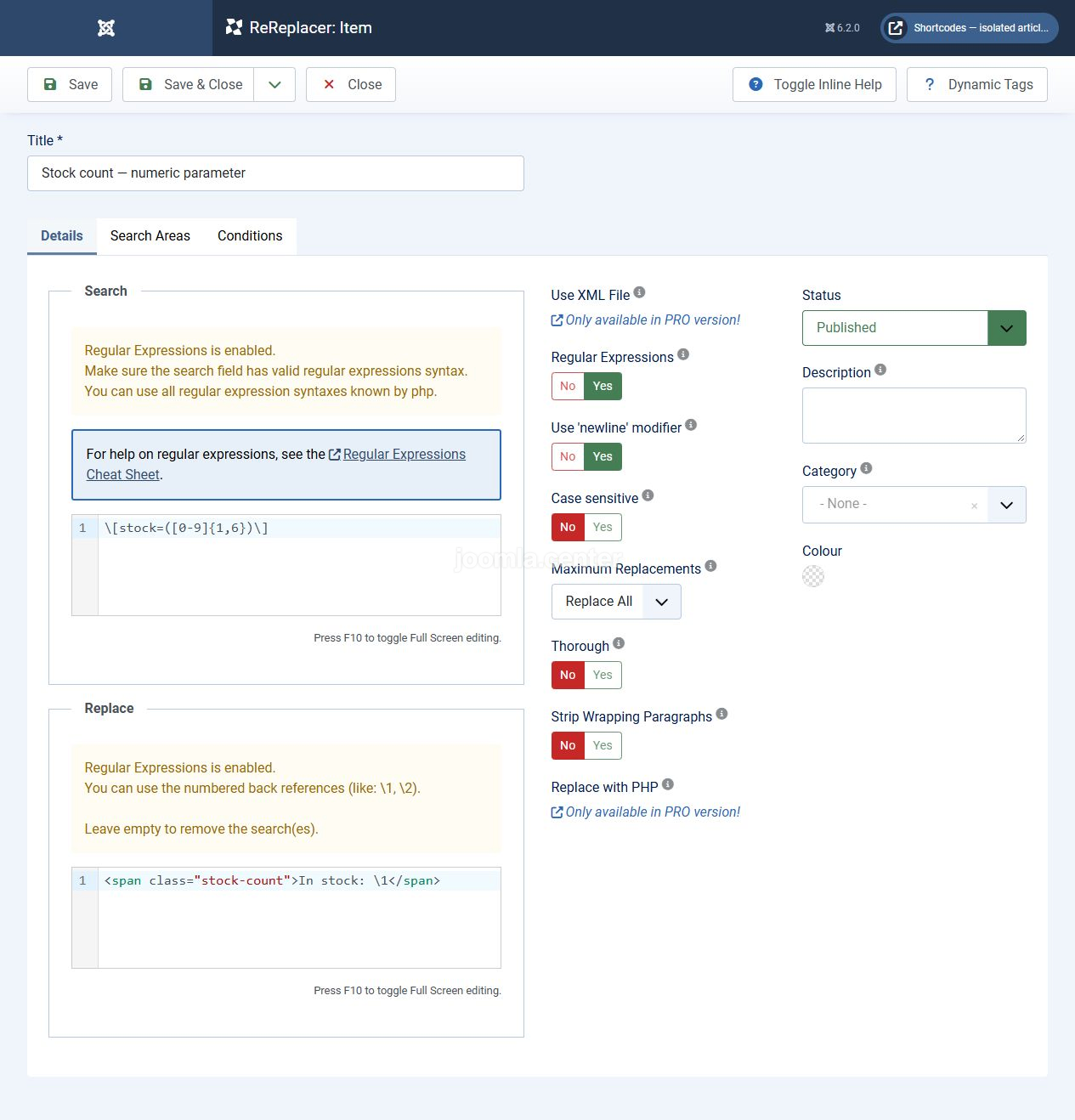
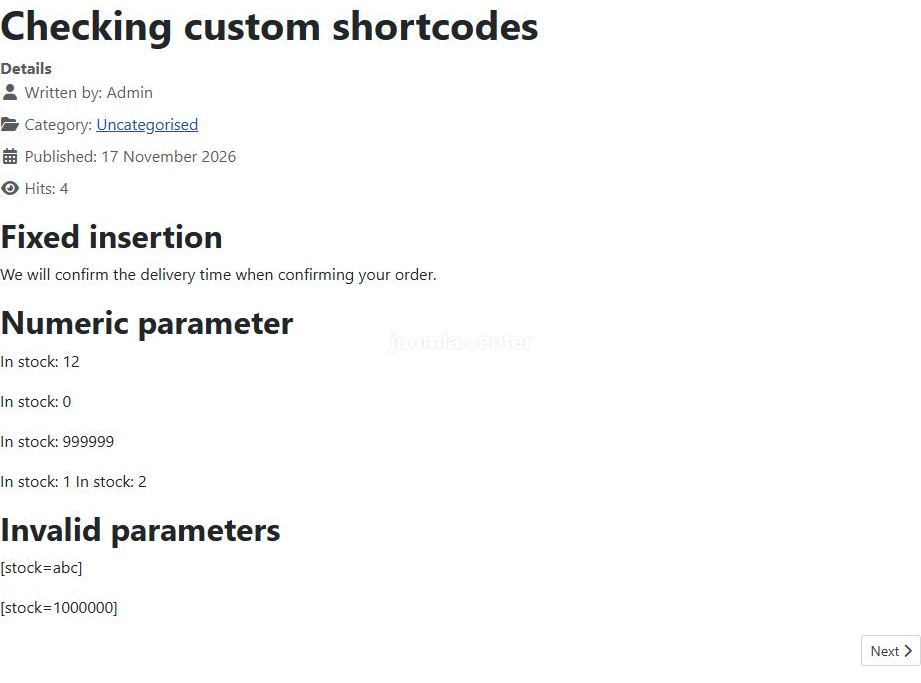
Use this token in an article:
[stock=12]The group ([0-9]{1,6}) accepts between one and six digits, and \1 inserts the captured value into the replacement. This is the expected HTML for the example:
<span class="stock-count">In stock: 12</span>This is a learning example. The number is entered manually and is not connected to an online shop's stock levels. Also test the invalid token [stock=abc], which should not match this rule. Check zero, several tokens in one article and a value containing seven digits separately.
Do not turn this example into a universal way to insert arbitrary text into HTML attributes, URLs or PHP. Such parameters need validation and escaping for the specific output context. If you need complex logic, access permissions or database content, use a dedicated Joomla plugin with explicit parameter handling.
Styling and limitations
A shortcode controls the replacement, while its appearance depends on the resulting HTML and the template's styles. The delivery-note and stock-count classes in these examples are arbitrary. They do not provide a particular appearance without your own styles.
Using Joomla does not mean that every page already loads the required styles, icon library or tooltip JavaScript. The older data-toggle="tooltip" example belonged to a different Bootstrap version. Before migrating interactive elements, check the library version, its assets and its initialisation in your template.
You cannot assume that custom shortcodes will make a site faster. They can reduce manual work, but they also need processing. Their effect on loading depends on the replacement rules and the resources used by the resulting HTML.
Migrate existing macros
Start a migration from RokCandy by making an inventory. Save the macro definitions and locate the articles, modules and menu items that use them. Record each macro's input syntax and expected HTML.
- Create an equivalent replacement in the new extension on a copy of the site. Keep the familiar syntax where possible, provided it is unambiguous and does not conflict with other plugins.
- Check fixed insertions first, followed by parameters and nested constructions. Processing order and recursive replacements can differ between extensions.
- When checking a macro, prevent the old and new extensions from processing it at the same time. Otherwise, the result will not show which rule handled it.
- Check full articles, category pages, modules and menus wherever tokens are used. Check guest access and edit forms separately.
- Once every macro in use has been migrated, disable RokCandy on the test copy and repeat the checks. Transfer the changes to the live site with a backup and a way to roll back.
Do not uninstall the old extension before completing these checks. If even one construction in use has not been migrated, visitors may see its original token.
If the token remains visible
Check the possible causes one at a time, starting with the simplest replacement on a separate test page.
- Extension and rule status. Make sure the required plugins are enabled and the replacement is published.
- An exact match. Compare brackets, hyphens, letter case and spaces. Account for special characters when using regular expressions.
- Search area. A rule for article content does not necessarily run in a module title or menu item.
- Editor HTML. Inspect the article's source. Formatting may have split the token with tags or added a non-breaking space.
- Cache. Refresh the cache used to display that particular page, then check it again as a guest.
- Other plugins. If another plugin needs to process a replacement's output, check their execution order and processing stages. Do not assume that nested tokens work automatically.
Choose an approach for your site
For a repeated fragment, start with a fixed ReReplacer insertion. Add parameters when you have a clear input format and suitable checks. Consider Easy Shortcodes if you prefer storing definitions in a template file or managing them through its Pro component.
RokCandy is relevant when maintaining an older site that already uses it. For a modern Joomla site, choose a compatible extension and test the actual macros on a copy of the site. Shortcodes are useful when they are easy for authors to use and straightforward for the site owner to maintain and migrate.


