


Table of contents
A slider can display several images, offers or articles in a single block. We compare DJ-ImageSlider, Slideshow CK and Smart Slider 3 for Joomla, explain the limits of their free editions and outline what to check before installation.
What is a slider?
A slider displays individual slides in sequence. Each slide can contain an image, text and a link. A carousel usually displays several items at once, while a layer-based builder lets you position headings, buttons, images and other elements separately within a slide.
In Joomla, an extension may include a component for managing slides and a module for displaying them. Some solutions let you configure slides directly in the module. The template position and the module's menu assignments determine where the block appears.
Do not hide essential information only on the second or third slide. Visitors should be able to find your main offer and reach it without waiting for an animation. If you need to display one message, start with a static block.
Compatibility and versions
The information below was checked on 12 November 2026. Before installation, confirm the package version, extension edition and developer's requirements.
| Extension | Verified version | Joomla | Free edition | When to consider it |
|---|---|---|---|---|
| DJ-ImageSlider | 5.0.1 | Package for Joomla 5 and 6 | Available | Images with captions and links, organised into slide categories |
| Slideshow CK | 2.9.7 | The developer lists Joomla 3, 4, 5 and 6 | Light | A manually managed selection of images and videos in a module |
| Smart Slider 3 | 3.5.1.40 | Documentation includes Joomla 4, 5 and 6 | Free | Sliders with separate text and image layers |
An extension's compatibility list may include Joomla 3 or 4, but this does not mean that the corresponding Joomla core version still receives standard support. Do not transfer an old collection of packages to a new website without checking it.
Joomla 6 requires PHP 8.3 or later. Smart Slider documentation lists its own minimum as PHP 7.4, which does not override Joomla's requirements. The Smart Slider changelog includes PHP 8.5 compatibility fixes. For DJ-ImageSlider and Slideshow CK, a Joomla 6 compatibility label alone does not establish support for every new PHP version. Test your particular combination of Joomla, extension and PHP on a copy of the website.
DJ-ImageSlider
DJ-ImageSlider separates content management from display. Slides are stored in the component and organised into categories, while the module selects which ones to show. The module can also load images from a folder.
Each slide has an image, title, description and link. The link can point to a Joomla article, a menu item or a custom URL. Options include display dates, transitions, arrows and navigation indicators. The developer advertises responsive layouts, swipe gestures and keyboard controls.
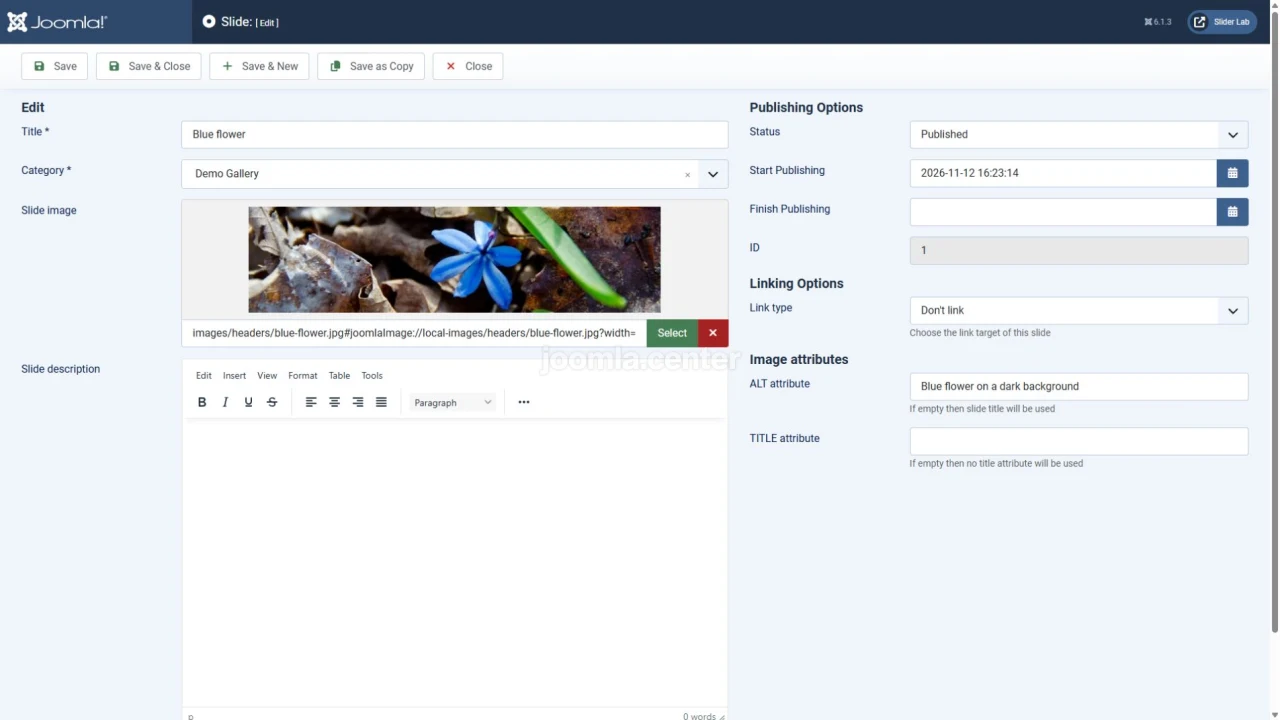
To build your first slider, install the package for your Joomla version, create a category in the DJ-ImageSlider component and add slides to it. Then open the DJ-ImageSlider module, select Component under Slider source and choose the category under Slides category. Set image dimensions, navigation controls, a template position and menu assignments. Check Keyboard access (WCAG) and whether visitors can reach a pause control.
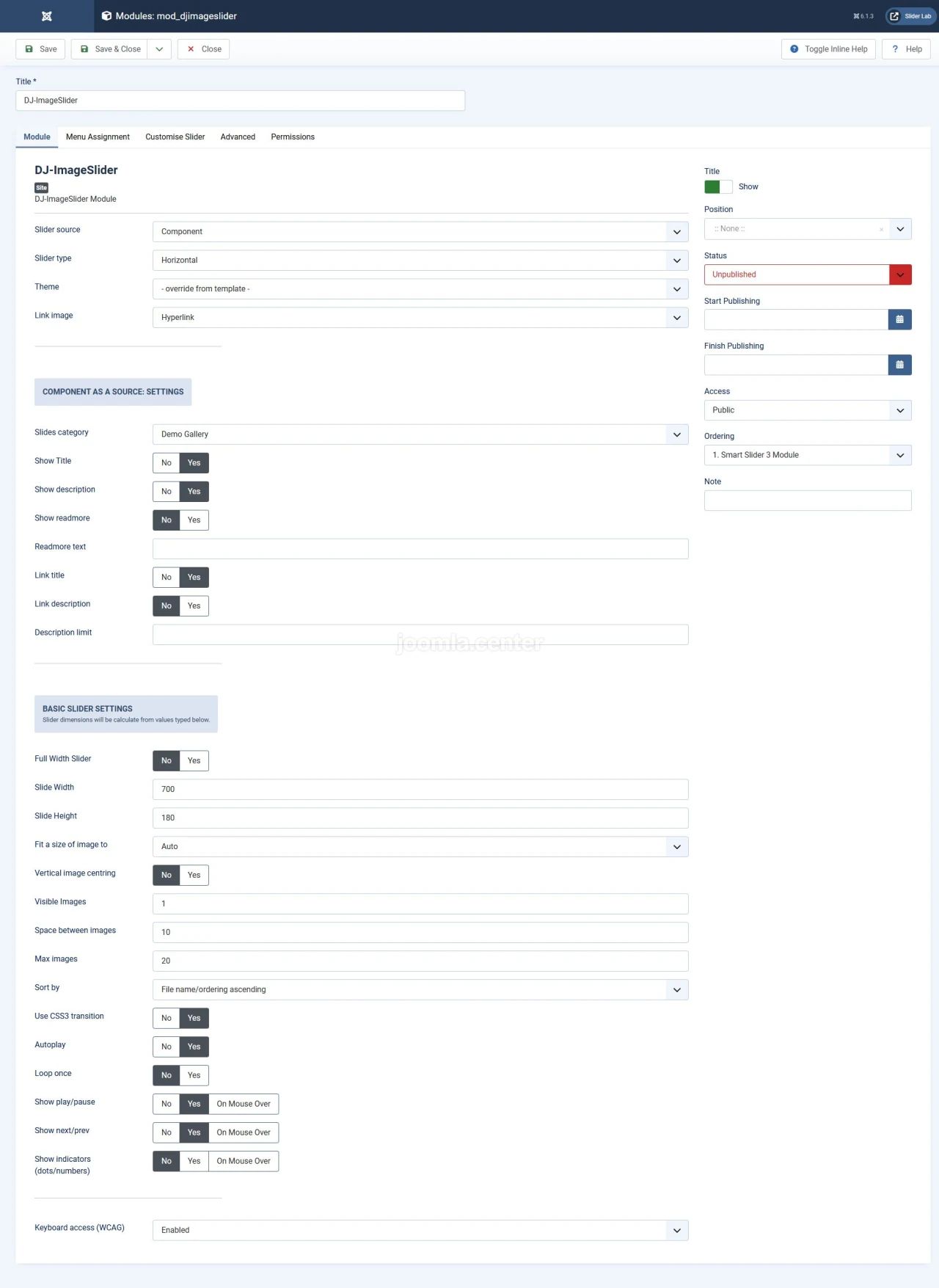
Add image alternative text and check link destinations as you create slides. Consider the slide category and publication dates, together with the module's language, access level and menu assignments.
DJ-ImageSlider is available free of charge. The developer's general licence terms place PHP code under GPLv2 and apply separate terms to other package resources. A free download does not mean that all licensing restrictions disappear.
Consider this extension for a managed collection of images with captions. A complex composition with independent layers calls for a different solution.
Slideshow CK
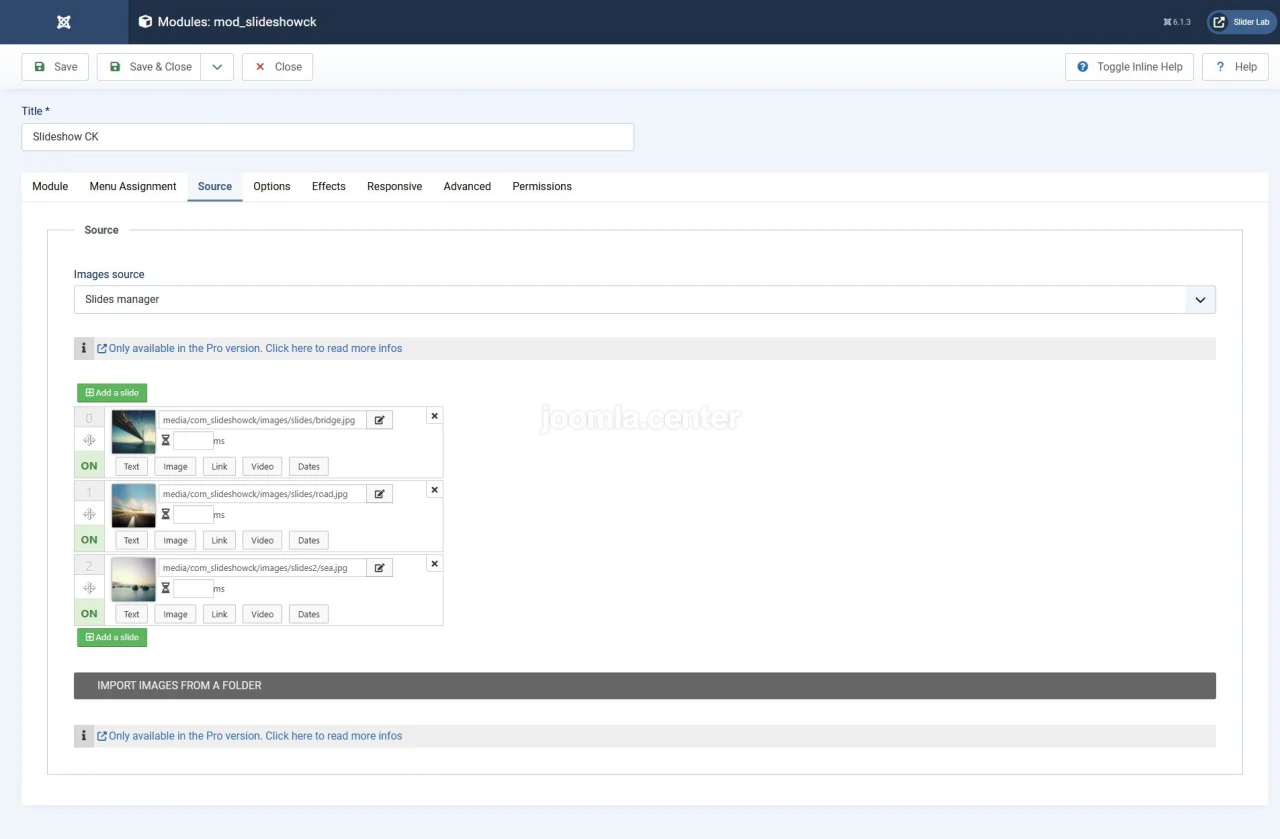
Slideshow CK lets you manage a manual selection of slides directly in the module. Its manager supports adding images, changing their order, and setting captions, links and videos. The settings include effects and responsive display options.
The current product range includes the free Light edition and paid Pro edition. Light includes the manual manager. Loading from a folder, automatically creating slides from an article category, additional integrations and Lightbox settings belong to Pro. Selecting a single article in the manual manager is different from loading an entire category automatically.
To get started, open the Slideshow CK module and go to Source. Select Slides manager, replace the sample images, and add captions and links. Then check Options, Effects and Responsive. Set the module's position and assign it to the appropriate Joomla pages.
Old instructions about buying Slideshow CK Params and theme packs no longer describe the current product range. Before purchasing, check the feature list for the edition you need. The downloaded Light package's manifest specifies GNU GPLv3. Check commercial subscription terms and the update period separately from the code licence.
Slideshow CK suits workflows where managing slides within one module is convenient. Allow for Pro if you need automatic sources or Lightbox.
Smart Slider 3
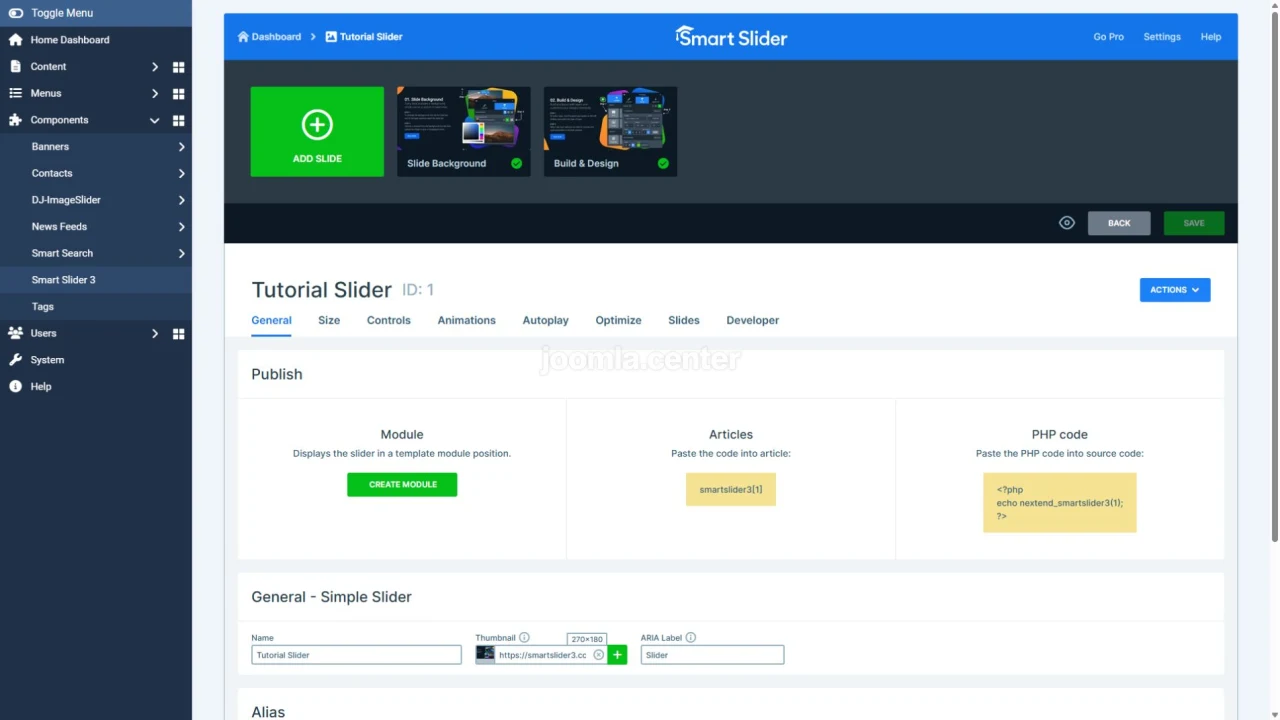
Smart Slider 3 uses a visual editor. You can build a slide from separate layers, such as a heading, text, an image and a button. Size and positioning settings help adapt the composition to different screens.
The Free edition provides a starting point with standard sliders and basic layers. Pro adds more slider types, layers, animations, Lightbox and advanced data sources. Do not assume that features shown in a paid demo template are available in Free.
Create a project in the Smart Slider 3 component, add slides and configure their content. In the project settings, check Size, Controls and Autoplay. Under General → Publish, click Create module, then choose a template position and menu assignments. The editor is intended for desktop browsers. Support for viewing sliders on phones does not imply support for editing them on a touchscreen.
The Free package specifies GNU GPLv3. For Pro, the developer offers commercial plans with activation on a set number of domains. Updates and support are tied to activated domains and are provided while the product is being developed. Account for this when estimating costs for several websites.
Consider Smart Slider for layered compositions and separate mobile layout adjustments. Choose Pro for the functions you need rather than the total number of effects.
RokSprocket and Slider Revolution
These names appear in older comparisons, but they need to be assessed separately from current Joomla 5 and 6 packages.
RokSprocket was used to display content in several formats, including sliders, lists and tabs. We could not find a verified current package with declared Joomla 6 support in the available primary sources. It therefore needs further verification before being recommended for a new website.
With Slider Revolution, distinguish the WordPress product from the older Joomla edition, Unite Revolution Slider. The WordPress plugin's version number and features do not establish compatibility for a Joomla package. Current support for Joomla 6 and modern PHP versions was also not confirmed for the older Joomla edition.
If one of these extensions already runs on an older website, first preserve the slide structure, text, images and links. Then check migration options on a test copy. Do not uninstall the extension before saving its data.
Accessibility and mobile devices
Responsive width is only part of the check. Visitors need to read the text, follow links and operate the slider without a mouse.
- Move through buttons and links with Tab and Shift+Tab. Focus should be visible, and hidden slides should not intercept keyboard interaction.
- Check that buttons can be activated with the keyboard. Swipe support does not replace accessible arrows and other controls.
- Provide a clear pause control for automatic rotation. Check that rotation stops on focus and hover, and resumes when the visitor requests it.
- Give buttons meaningful names and images appropriate alternative text. Make sure a screen reader does not treat hidden slides as active content.
- Reduce unnecessary motion. If Respect reduced motion is available, check it with the corresponding system preference enabled.
- On a narrow screen, check text, buttons, image cropping and vertical scrolling. Keep important text available outside images.
If an image or video opens in a modal window, separately check Escape to close, a visible close button, focus containment within the window and focus returning to the original control. A developer's accessibility claim does not replace testing the finished page with your template.
How to choose a slider
Start with DJ-ImageSlider for image collections organised into categories. Consider Slideshow CK Light if you want a manual manager directly in the module. For independent layers and complex compositions, try Smart Slider Free, then compare your requirements with the Pro feature list.
Before deploying to a live website, build a small example on a copy of Joomla. Check navigation, language, access, mobile layout and compatibility with your template. Compare performance using the same content and equivalent pages. The ZIP archive's size does not show how many resources a visitor's browser will load.
The best slider solves a specific task and remains easy for visitors to use. If a static block or free edition provides the result you need, extra effects and a paid package may be unnecessary.


