


Table of contents
Moving Joomla to HTTPS requires a valid certificate, correct server settings and checks of the website itself. This guide explains how to obtain and renew a certificate, enable HTTPS in Joomla, and resolve mixed content or redirect loops.
SSL, TLS and HTTPS: what is the difference?
HTTPS is HTTP transmitted over a secure TLS connection. TLS encrypts data in transit, protects it against undetected changes and allows the browser to verify the server’s identity.
The term SSL certificate still appears in hosting control panels and certificate authority offers. However, SSL is the obsolete predecessor of TLS. For a modern website, TLS certificate or SSL/TLS certificate is more accurate.
HTTPS protects passwords, form submissions and other data travelling between the browser and the server. A certificate does not protect Joomla against vulnerable extensions, prevent a website from being hacked or prove that its owner is trustworthy.
A green padlock or a green company name in the address bar is an outdated reference point. Modern browsers display connection information differently. Check for warnings and inspect the certificate’s validity in the browser’s site information.
Choosing a certificate
The certificate must cover every hostname visitors use to access the website. A domain with www and the same domain without it are different names. Even when one redirects to the other, the original HTTPS address needs a suitable certificate: TLS validation takes place before the redirect.
For most ordinary Joomla websites, a DV certificate that verifies control of the domain is suitable. OV and EV certificates also verify the organisation. These are differences in identity checks, rather than settings that determine encryption strength.
A certificate with multiple SAN entries can cover several names. A wildcard such as *.example.com covers subdomains one level below the domain, including www.example.com and shop.example.com. By itself, it does not cover example.com or a.shop.example.com.
A Cyrillic domain name is represented in a certificate in ASCII form using Punycode. Check whether your chosen certificate authority supports the domain.
A dedicated IP address is usually unnecessary. Modern servers and browsers support SNI, which allows several HTTPS websites to share one IP address.
Obtaining and renewing a certificate
A certificate authority issues the certificate. The hosting provider, server administrator or proxy operator installs it. Joomla does not issue certificates itself.
Obtaining and installing a certificate
On shared hosting, start with the domain’s hosting control panel. It often provides a free Let’s Encrypt certificate with automatic renewal. On a server you administer yourself, an ACME client such as Certbot can perform these tasks.
The general process is:
- Specify the required domain names.
- Prove control of them using a method supported by the chosen service.
- Install the certificate, its matching private key and the required intermediate certificates.
- Check that the website opens over HTTPS before enabling forced redirects.
Let’s Encrypt supports automated validation through HTTP or DNS. HTTP-01 requires access to the challenge URL on port 80. Wildcard certificates use DNS-01. If you update DNS records manually, check how the next renewal will be completed.
Keep the private key secure. Do not paste it into a Joomla article or send it through ordinary email. When installing a certificate through your hosting provider, use the secure interface provided for that purpose.
Arranging renewal
Certificates have a limited validity period. It depends on the certificate authority and issuance profile; the claim that every certificate lasts one year is incorrect. The period covered by a paid service may also differ from the validity of an individual certificate.
Configure automatic renewal in advance and check that:
- the renewal task runs;
- domain validation remains possible;
- the new certificate is installed for the correct website;
- the server or proxy starts using it after the update;
- renewal errors generate notifications.
Check the expiry date of the certificate actually presented to visitors. Having a new certificate file on the server does not necessarily mean the website is already using it.
Where HTTPS is configured
The migration involves several layers, each with its own responsibilities.
| Layer | Responsibilities |
|---|---|
| Hosting provider | Certificate issuance and installation, renewal, available domain settings |
| Web server | Accepting HTTPS connections, presenting the certificate, redirecting HTTP requests |
| Joomla | Enforcing HTTPS for pages it processes and generating URLs |
| Reverse proxy or CDN | Public HTTPS connection, connection to the origin server, forwarding information about the original request |
First, back up the files and database. Save the original server configuration and ensure you can access the files through the hosting control panel or another supported method. This allows you to correct a setting if the Joomla administrator interface becomes inaccessible.
Enabling HTTPS in Joomla
After installing the certificate, manually open both the website and its administrator interface over HTTPS. If the browser reports a certificate error, resolve it on the hosting or server side first.
In Joomla 4, 5 and 6, open System → Global Configuration → Server. Find Force HTTPS in the server settings.
| English interface | Russian interface | Behaviour |
|---|---|---|
| None | Нет | Joomla does not enforce HTTPS |
| Administrator Only | Панель управления | Enforces HTTPS for the administrator interface only |
| Entire Site | Весь сайт | Enforces HTTPS for the website and administrator interface |
To migrate the whole website, select Entire Site, save the settings and check both parts of the website.
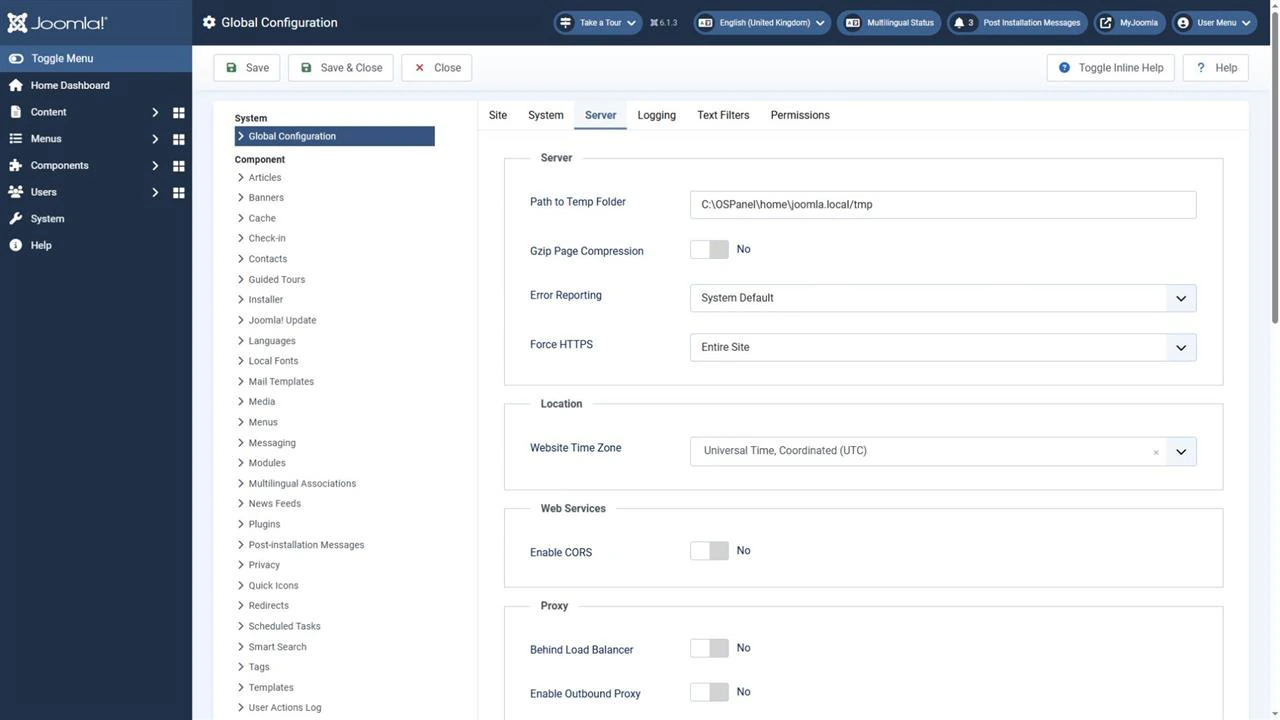
The setting is stored in the force_ssl parameter of configuration.php: 0 means None, 1 means Administrator Only and 2 means Entire Site. Changing it through the Joomla interface is usually more convenient.
The live_site parameter normally remains empty in a standard configuration. You do not need to enter the website address solely to enable HTTPS. If it already contains a value, check for an outdated domain, protocol or path.
Force HTTPS does not install a certificate or correct HTTP URLs entered manually in articles, modules, templates or extensions. Joomla redirects also do not cover files served directly by the web server.
Redirecting HTTP to HTTPS
Old HTTP addresses should redirect to their corresponding HTTPS pages while preserving the path and query parameters. Do not redirect every page to the home page.
A general redirect is usually easier to configure in the hosting control panel or on the public-facing web server. Coordinate the rules across Joomla, hosting, the server and CDN so that they use the same protocol and preferred domain.
The following examples apply to a server without a reverse proxy, where HTTPS terminates directly on that server. Replace example.com with your preferred domain. Preserve the challenge handling required by your ACME client.
Apache and .htaccess
If Apache permits rules in .htaccess and mod_rewrite is enabled, a redirect can look like this:
RewriteEngine On
RewriteCond %{HTTPS} !=on
RewriteRule ^ https://example.com%{REQUEST_URI} [R=301,L]
Place the rule before Joomla’s routing rules. Do not replace the entire existing .htaccess file with this example.
This example redirects HTTP to HTTPS. Choosing a preferred domain with or without www may require a separate, coordinated rule.
Nginx
Nginx does not read .htaccess. Configure redirects in the server configuration or through the hosting control panel.
Example HTTP server block:
server {
    listen 80;
    server_name example.com www.example.com;
    return 301 https://example.com$request_uri;
}
HTTPS requires a separate configured server block with the certificate. Before applying changes, check the configuration syntax, then reload the configuration using the procedure supported by your server.
Do not apply these examples behind a reverse proxy without checking the connection arrangement. The internal server may receive HTTP even when the visitor is already using HTTPS.
Joomla behind a reverse proxy
A reverse proxy or CDN can accept HTTPS from visitors and then contact Joomla over HTTP. If Joomla does not receive reliable information about the original protocol, it redirects the visitor to HTTPS again. The next request arrives in the same way, creating a loop.
Global Configuration → Server → Proxy Settings contains the Behind Load Balancer option. Use it when the website actually operates behind an appropriate proxy.
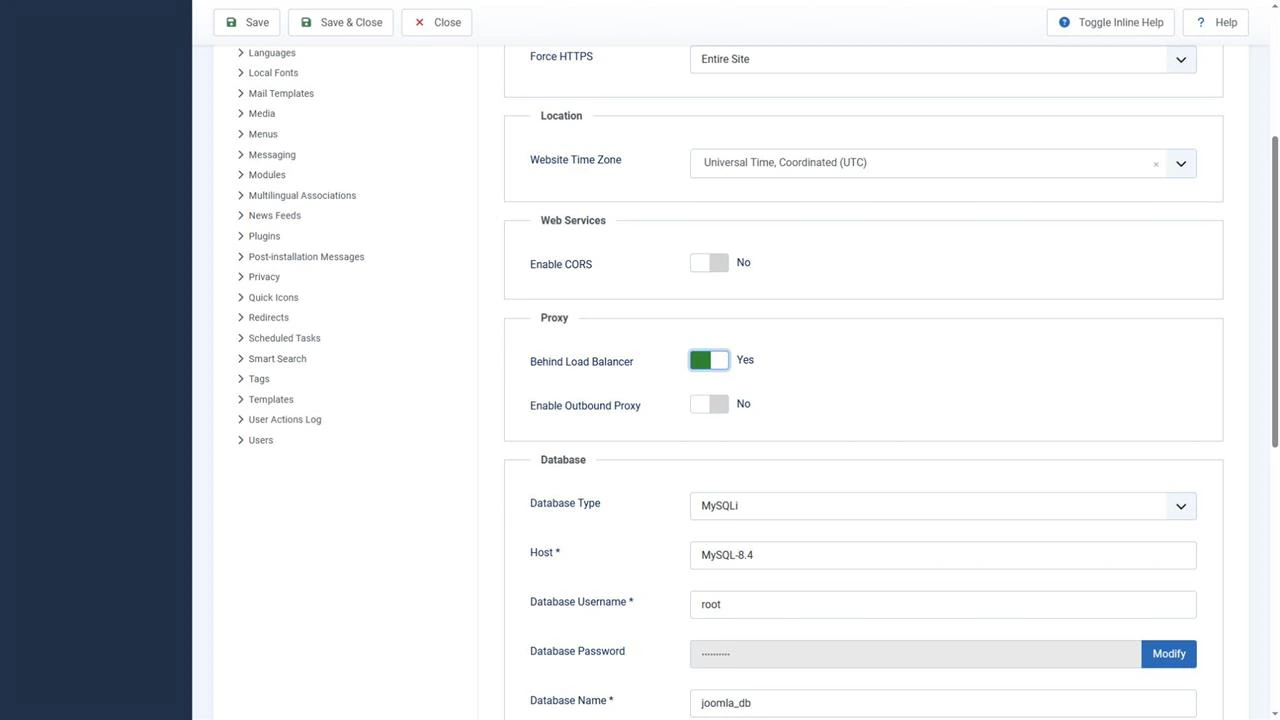
Before enabling it, ensure the proxy correctly forwards the original protocol and client address, and that the server accepts this information only from a trusted proxy. Visitors must not be able to forge it by making direct requests to the origin server.
The Enable Outbound Proxy setting applies to requests made by Joomla itself. It does not resolve the detection of incoming HTTPS requests.
Cloudflare’s Flexible mode uses HTTP between Cloudflare and the origin server. Enforcing HTTPS on the origin can therefore cause a redirect loop. For an encrypted connection that validates the origin certificate, use Full (strict) after installing a suitable valid certificate.
Do not override the protocol unconditionally with $_SERVER['HTTPS'] = 'on'. This hides the actual request state instead of correcting the configuration.
Mixed content and links
Mixed content occurs when an HTTPS page attempts to load resources over HTTP. These can include stylesheets, scripts, fonts, images, iframes or requests made by extensions. Browsers block some requests or automatically upgrade them to HTTPS; do not rely on this behaviour.
Open the affected page, launch the developer tools and inspect the Console and Network tabs. Identify the resource URL and where it is included: an article, module, template, CSS file or extension.
Use correct relative paths for resources on your own website. For third-party resources, specify an explicit HTTPS URL after checking that it works. If HTTPS is unsupported, replace the resource or remove the integration.
Do not use URLs such as //example.com/file.js as a migration method: they inherit the page’s protocol.
Write internal page links relative to the domain, for example /knowledge-base/configuration-php. Joomla system URLs should have no leading slash: index.php?option=com_content&view=article&id=123.
Also check form submission URLs. Data must be sent over HTTPS from the outset: a redirect after an HTTP request does not protect information already transmitted.
Common errors
Certificate errors and redirect errors require different fixes.
| Symptom | What to check |
|---|---|
| The certificate has expired | Renewal, installation of the new certificate and the certificate actually served |
| The certificate does not match the domain | Required names in SAN, including versions with and without www |
| The browser does not trust the certificate | Intermediate certificates, the certificate selected for the website and the device’s clock |
ERR_TOO_MANY_REDIRECTS |
Conflicting rules, proxy settings and detection of the original HTTPS request |
| Styles, images or functionality are missing | Blocked HTTP resources, incorrect paths and request errors |
| The old certificate appears after renewal | Active server configuration, proxies and every node serving the domain |
| Login sessions are lost | Changes between domains or protocols, cookie settings and caching |
For redirect loops, inspect the sequence of responses and their Location headers. Repeated URLs or alternation between HTTP and HTTPS, or between domains with and without www, help identify the conflict.
Correct the rule at the layer where it originates. Clearing cookies or caches may remove an old state after the fix, but does not resolve contradictory configuration.
Do not disable certificate verification in the browser, PHP, an HTTP client, an extension or a proxy. Correct the domain name, validity period, trust chain or trusted certificate store.
Checks after migration
After configuration, test the home page, several internal pages, the administrator interface, login, search, forms and the functionality of installed extensions.
Confirm that:
- HTTP pages redirect to their corresponding HTTPS URLs;
- paths and query parameters are preserved;
- there are no loops or unnecessary redirect chains;
- HTTPS pages open without warnings;
- resources and forms use secure URLs;
- internal links lead directly to the intended version of each page;
- canonical URLs, language links and the XML sitemap contain the correct HTTPS addresses.
Check the HTTPS version in Google Search Console. A domain property already covers different protocols; a URL-prefix property applies to a specific protocol. The Change of Address tool is unnecessary when switching only from HTTP to HTTPS.
Check the HTTPS version in Yandex Webmaster and submit the current sitemap. You do not need to add the Host directive to robots.txt: Yandex discontinued its use. HTTP URLs should remain accessible to search crawlers so that they can receive the redirects.
Configure HSTS after confirming stable HTTPS operation and certificate renewal. Do not enable coverage of all subdomains or preload until their readiness and the consequences of that policy have been checked.
Conclusion
Installing a certificate or changing one setting is insufficient for reliable HTTPS in Joomla. Automatic renewal, coordinated redirects, correct proxy handling and the removal of HTTP resources are all required. After migration, continue monitoring certificate expiry and renewal errors.


